2

When I run a diff or merge, I would like the window to span all monitors so I can see the entirety of both files at once. Is there a windows 7 shortcut to do this?

Edit: Since the hotkey doesn't exist, how about something that is light and quick to setup that runs a configurable script to do this? Free is better.

Justin
  • 81
  • 7

2 Answers2

2

There isn't. Due to the many different possible monitor configurations a feature like this is impossible to implement properly (thus, I claim that it wasn't implemented).

For example, look what happens when I maximize Notepad over all screens:

enter image description here

In the middle, on the main screen, the top and bottom are cut off because the outer screens are simply higher.

That being said, I actually used exactly the functionality you describe to make that screenshot. But I used the functionality provided by UtltraMon (commercial).

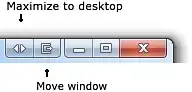
It has a maximize to desktop functionality: enter image description here

Oliver Salzburg
  • 86,445
  • 63
  • 260
  • 306
2

There are many utilities that add this functionality to Windows.

Before installing a third-party utility, check if your video-card software has built-in support for spanning over multiple monitors.

Otherwise here are some utilities :

VirtualScreenMaximizer (free), review by lifehacker available.

This SuperUser answer for How can you maximize a window on to dual monitors in Windows 7? contains an autoit script for maximizing over two monitors.

DisplayFusion, free version and pro version ($25). The free version might contain this feature.

Actual Multiple Monitors, free version and pro version ($29.95). It's unclear whether the free version contains this feature. Its "Maximize to Desktop" function can maximize to more than two monitors :

image

harrymc
  • 455,459
  • 31
  • 526
  • 924