9

I built a large help document for an application I wrote. I used all the default styles in Word 2010, including "Title", "Heading 1", "Heading 2", etc. Sadly, when I generated the Table of Contents, Titles were not included. I'm also now using chmProcessor to automatically generate a website from the document, and it's not including Titles in its Table of Contents either.

I'd like to make all Titles into Heading 1s, all Heading 1s into Heading 2s, and Heading 2s into Heading 3s, etc. Is this possible without a huge manual effort? (I'm sure there's a better word than "demote" for this.)

Indrek
  • 24,204
  • 14
  • 90
  • 93
dangowans
  • 1,960
  • 1
  • 20
  • 34

2 Answers2

10

Alternatively, you can go up to the "Styles" panel in the ribbon and right click the desired style, and click "Select All", and then simply pick a different style.

TheCompWiz
  • 10,602
  • 1
  • 23
  • 21
6

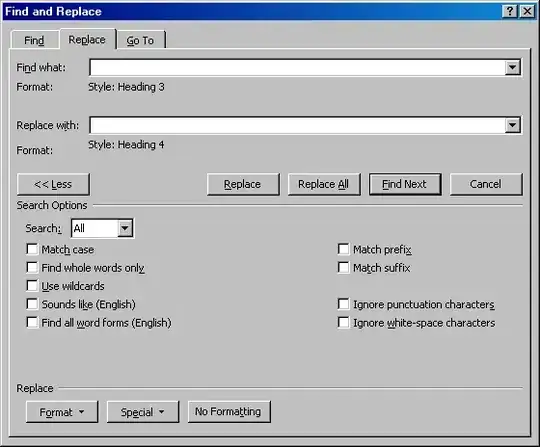
Under the "Home" ribbon, in the "Editing" section, select "Replace".

Find and Replace

You may need to select "More" to see all the options.

Put the cursor in the "Find what" field. At the bottom, click the "Format" button. Select "Style". Select the style that should be "demoted". Start with the lowest level style in the document (ie. don't start at the titles). Note that the style will be shown below the field, not in the field.

Put the cursor in the "Replace with" field, and follow the same instructions to select the style that it should be demoted to.

Click "Replace All" to update the styles. Run through each of the styles.

dangowans
  • 1,960
  • 1
  • 20
  • 34