14

Has anyone come across software that can do this successfully/reliably?

I would like to set up my Nexus 7 tablet on a stand under my monitor and use it with the mouse/KB hooked up to my desktop so I can continue to use it while using my desktop without having to pick it up.

I was able to find one application which claims to do this (PC Loves Android), but reviews on the Google Play store do not seem to favor it.

Sathyajith Bhat
  • 61,504
  • 38
  • 179
  • 264
kashiko
  • 141
  • 1
  • 1
  • 6
  • 1
    So let me get this straight, you want to use a splitter to plug a keyboard into a desktop and a tablet at the same time? If not feel free to correct me. – user88311 Oct 01 '12 at 12:05
  • Are you looking to use your device as a second monitor? See: [Is it possible to use an Android device as a second monitor?](http://android.stackexchange.com/q/1922) – ale Oct 01 '12 at 17:22
  • Sorry about the confusion. I mean a software solution to share keyboard/mouse between Windows on the desktop and Android on the tablet. Like the program Synergy does for Windows/Linux/OSX. – kashiko Oct 01 '12 at 20:23
  • 1
    There is a [Synergy for Android](http://sourceforge.net/projects/synergyandroid/) client in the planning stages. – ale Oct 02 '12 at 01:27
  • How about [Android Screen Cast](http://code.google.com/p/androidscreencast/)? (Requires root) – ale Oct 02 '12 at 01:34
  • Synergy for Android appears to be abandoned (planning stages, but no activity in 15 months). Android Screen Cast seems like it would do something similar, I'll have to check it out. It may not be ideal since it is meant as a remote-desktop like client rather than a input device sharing program. Thanks for your suggestions :). – kashiko Oct 03 '12 at 20:19

4 Answers4

11

I searched for ages for this very same thing. I found the Share Keyboard & Mouse app (by SmartUX) on the Google play store which should do what you want. You can find the PC client on their web page.

Vala
  • 105
  • 9
Jamie
  • 126
  • 2
  • 3
  • You made my day. Downloading this now. It is in beta but it looks to be the most promising solution. I am glad they included alternative modes (USB/WiFi/Bluetooth) including ones which do not require a rooted device. – kashiko Dec 01 '12 at 01:32
  • Looks like it works. A bit choppy sometimes over USB, I may try the other connectivity options. – kashiko Dec 01 '12 at 01:45
  • Mmm... Interesting. Testing... – kokbira Mar 20 '13 at 18:48
  • 4
    Mine just "expired" today... "beta 1 expired" on the Android App. I can't find any other app that does this. Tis a sad day. – Phenome Mar 31 '14 at 13:20
  • @Phenome Yeah, same for me. I'm casting about for an alternative now. You had any luck? – Patrick May 19 '14 at 17:10
  • You can manually change the date on your Android to something before 3/30/2014 before starting the app and it will still allow the connection to complete. It's a hassle though. I would pay for a fix, love this app. – Walter Jun 12 '14 at 18:35
  • If you have root device install Xposed Framework with the "Per App Hacking" module. Then add app ShareKM and setup the "Time Machine" as "2014-02-30 12:00". It works ;-) – Alberto Nov 11 '14 at 22:17
  • As ShareKM seemed to be abandoned, I developed my own app. For details, scroll down to my answer. – FD_ Sep 02 '16 at 10:31
6

I was looking for the same thing, after a long search I found a little known piece of software that does the work nicely over Bluetooth for android/windows/Mac. The android client is even updated this year.

Acrosscenter

I have it working with a Samsung Galaxy Tab 2 10.1 (rooted with CM12) and windows 7.

zeel
  • 3,218
  • 6
  • 37
  • 51
lgg
  • 89
  • 1
  • 5
  • This actually seems to work. It is unfortunately not free, but it lets your PC act as a Bluetooth input device for and Android device. I haven't done too much testing yet, but mouse and keyboard seem to work without issue. – zeel Mar 03 '20 at 05:05
  • AcrossCenter is now free! This still works for me between two Windows PCs connected via bluetooth. – Lyle Brown Mar 24 '20 at 05:25
  • @LyleBrown i don't think it's free, typing certain letter keys gets disabled after 30 minutes. Pretty much unusable without being able to type. – tinker Jul 30 '21 at 02:30
4

I was also looking for such a solution that would allow me to share my computer's Mouse and Keyboard with my Android devices. I was using ShareKM until it was abandoned and no longer worked on recent Android versions.

Eventually, I developed my own solution, DeskDock, that works on all major Desktop OSs (Windows, Mac, Linux) and with all recent Android versions (starting from 4.1). It does not require root access and provides advanced functions such as drag and drop.

I just released it a few days ago to Google Play.

FD_
  • 159
  • 2
  • Hi, i got bugs, not stable on my android 11 phone andwindows 10 pc, mouse curser getting lostt many times. and also the hasstle of setting up my usb cable got disconnected randomly and tried the wireless adb, and sadly it made the setting up even more time consuming. and yep already bought the premium version – Jovylle Dec 08 '21 at 16:38
  • any plans to add sharing through wifi network? – aljgom Jun 01 '22 at 06:21
2

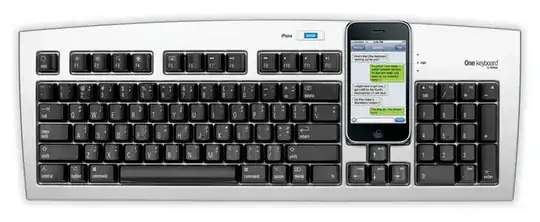
I realize the question was about a software solution but I just came across this Matias keyboard the other day. That looks like would work for this question.

They market it for iPhones but it looks like it will work with Android devices as well:

Also connects to other devices.
We designed the keyboard to connect wirelessly to your iPhone, but it's actually a standard Bluetooth connection, so it'll work with any device that supports Bluetooth keyboards.

That includes... the iPod touch, iPad, Macs and PCs, Android 3.0+ smartphones and tablets, Samsung Galaxy Tab, BlackBerry PlayBook, and many more.

enter image description here

Brad Patton
  • 10,540
  • 12
  • 40
  • 68