I'm getting very frustrated with this. I know I can use an external mouse and disable the touch pad, but that isn't always convenient.
I'm running Windows 7 on an EEEPc 900HA
If you're using Windows XP and the Synaptics driver is installed on your Eee PC you can find advanced settings here:
edit: install the Windows Vista Driver from the Synaptics support page (no Win7 driver available yet, but the Vista driver works.
(I'm 99% sure, the 900HA features the Synaptics touchpad, the ElanTec touchpad for the Eee PC was introduced later with the 901)
If you want to disable the touchpad altogether, try TouchFreeze or MS DevCon (can't say whether they work with 7 though).

TouchFreeze is exactly what you're looking for, the touchpad is disabled only when you are typing:
Annoyed when you are typing a document and accidentally the palm of your hand brushes the touchpad, changing the position of the cursor in your document or accidentally clicking on an option. TouchFreeze is simple utility for Windows NT/2000/XP that solves this problem. It automatically disables touchpad while you are typing text. Like syndaemon on x-windows.

Depending on you OS (with the eee-pc I assume it's some linux variant) you may be able to configure the touchpad - those instructions are for Ubuntu, but maybe be useful for other distributions (not sure what is native on the eee-pc).

Depending on your model, there may be a switch on the keyboard to switch off the track pad. You can switch it off before doing a bunch of typing, it's little more effort than clicking a mouse button.

There are often options in touchpad drivers to disable the trackpad while typing. Since you don't say what hardware or OS you have, there's no way to be more specific.

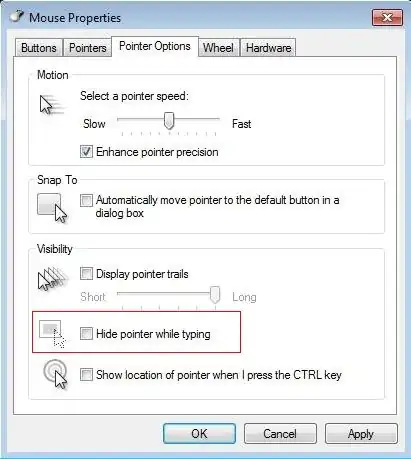
Go to Control Panel / Mouse / Pointer Options.
Is Hide pointer while typing unchecked ?