4

A lots of thanks to terdon who spent so many time on this and finally solve the issue.

A friend of mine has installed on my new machine Ubuntu 12.04 (I have always been windows user and have no experience with Linux).

I started to watch some tutorial about how to make 'Rotated Cube' using 'Compiz',but the cube appears in the form of a list (only two slides).

I have thought this could be result of my video cards (only two - one from the processor and one from the motherboard) and they can not support this options. Anyway, I have decided to disable all compiz plugins and options because my friend has set some, and I started to think there is some misunderstanding between the plugins.

After, that I got only empty screen(no menu, no icons, anything) and can do nothing. How to fix this?

EDIT:

When I remove the compiz stuffs (from the console), the menu is shown again. Then I install the compiz again (some of the effect are still not working). After restart or log out/in the menu is hidden again. I suppose that there are some settings that I've broken but they are saved somewhere in the system and remove the compiz do not deleted them and as a result they are activated after compiz is installed again and the PC is restarted?

gotqn
  • 482
  • 4
  • 12
  • 29
  • Have you tried fixing the settings with [compiz config settings manager](http://wiki.compiz.org/CCSM)? You can install it using the command: `sudo apt-get install compizconfig-settings-manager` – schluchc Oct 10 '12 at 08:30
  • Yes, as I remove the compiz stuff, the installed them again and it looks good. Then, after restart or log out/log in, the icons and menu disappears again. Maybe, somewhere is saved configuration file with the old settings? Also, after installing the compiz again, the settings in the manager looks normal (the default ones). – gotqn Oct 10 '12 at 09:10
  • @gotqn What happens if you press `alt+F2` and type `compiz --replace` or `metacity --replace`? – p_strand Oct 10 '12 at 15:30
  • @p_strand compiz --replace said the compiz is not intalled on my machine. The metacity --replace gives me strange messages like "Window manager warning: meta_window_activate called by a pager with a 0 timestamp; the pager needs to be fixed." and takes a lot of time (10 minutes) so I stopped it. – gotqn Oct 10 '12 at 20:35
  • try this...Delete the _.compiz_ folder in HOME folder (hidden by default...press CTRL+H to reveal) it will reset compiz settings... – Prasad RD Oct 11 '12 at 05:50
  • @Prasad, thank you, I will try this tonight at home and let you know what happened. – gotqn Oct 11 '12 at 06:18
  • Is it ubuntu 12.04 or 10.04? please edit your question, you have mentioned both :) – Prasad RD Oct 11 '12 at 06:22
  • @Prasad I delete the file, but then after installation the issue come back again - no menus and desktop bar. I try also to use "purge" and restore the default compiz settings but both do not help. – gotqn Oct 11 '12 at 17:21

1 Answers1

2

The reason that the cube appeared as a "list" has nothing to do with the number or quality of your graphics cards. The cube plugin simply shows your workspaces arranged as the sides of a cube. You get a sheet because you only have two workspaces configured. You can change this in compiz-config-settings-manager (ccsm).

Having said that, try the following steps (adapted from here):

sudo apt-get purge compiz*
sudo apt-get install compiz compizconfig-settings-manager compiz-fusion-plugins-extra compiz-fusion-plugins-main compiz-plugins

The first command will completely remove any compiz installation, and the second will reinstall it. Now, open a terminal (Ctrl+Alt+T) and launch compiz-config-settings-manager:

ccsm

Scroll down to the "Desktop" section and make sure the Enable Ubuntu Unity Plugin checkbox is checked:

enter image description here enter image description here

Now, click "Back" to go back to the main menu. Check the Desktop Cube checkbox. If a message pops up asking if you want to disable Desktop Wall in favor of the cube,click "Disable Desktop Wall".

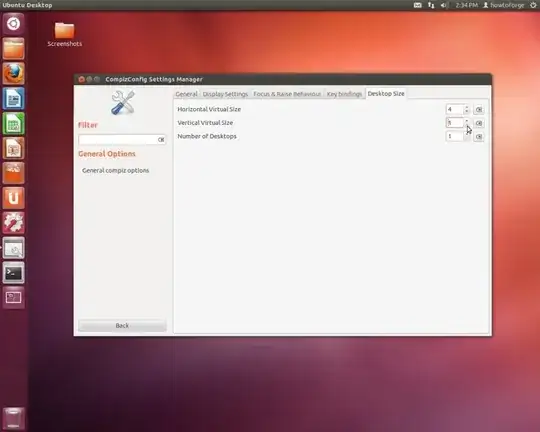
Compiz uses "virtual desktops" as opposed to normal desktops (see the compiz wiki here for more info). To have a cube that looks like a cube, you need to tell compiz to use 4 virtual desktops. To do this, go "Back" again, click the "General Options" button and choose the "Desktop Size" tab. Set your Horizontal Virtual Size to 4:

enter image description here

terdon
  • 52,568
  • 14
  • 124
  • 170
  • Thank you for the answer. Unfortunately, the Ubuntu Unity Plugin is not available. Should I search how to install it? – gotqn Oct 12 '12 at 17:52
  • Are you sure you are running Ubuntu 12.04 and not Kubuntu or Xubuntu or any other version? Is your desktop environment unity? What is the output of `lsb_release -a`? Also, see [here](https://help.ubuntu.com/community/CompositeManager) for more help. – terdon Oct 12 '12 at 18:00
  • "No LSB modules are available. Distributor ID: Ubuntu Description: Ubuntu 12.04.1 LTS Release: 12.04 Codename: precise" - that's the output – gotqn Oct 12 '12 at 18:05
  • Did you run the commands I gave you? Both the `apt-get purge` _and_ the `ap_get install` lines? – terdon Oct 12 '12 at 18:11
  • Yes. Do you think I should executed the commands from this answer:http://askubuntu.com/questions/131016/how-can-i-remove-and-re-install-unity – gotqn Oct 12 '12 at 18:13
  • Yes you could try. Especially the `sudo apt-get install git compiz-plugins-extra` and `sudo apt-get install compiz-plugins-extra` but try running all of them. From my understanding (I do not use Ubuntu so I can't check right now) the unity plugin should be a part of the ubuntu ccsm. One of the compiz plugins packages should install it. – terdon Oct 12 '12 at 18:17
  • let us [continue this discussion in chat](http://chat.stackexchange.com/rooms/6105/discussion-between-gotqn-and-terdon) – gotqn Oct 12 '12 at 20:05