40

How do I download videos from YouTube with subtitles / captions?

I'd tried by using youtube-dl, with --write-srt --str-lang flags but I always get:

WARNING: video has no closed captions.

slhck
  • 223,558
  • 70
  • 607
  • 592
Jack
  • 1,135
  • 5
  • 17
  • 29
  • 1
    Well, does the video have closed captions? I cannot reproduce this issue for videos that have the `CC` sign available. Which video are you trying to download? Does it work with [this one](http://www.youtube.com/watch?v=3PuHGKnboNY)? – slhck Oct 07 '12 at 20:31
  • Yes. Have the `CC` sign. For video that you have posted it worked fine. But for all that I had tried before it does not work, e.g for this video: http://www.youtube.com/watch?v=RHy9_RQbrnQ I get: `WARNING: video has no closed captions` unlike as you can see into youtube page. ` – Jack Oct 08 '12 at 00:29
  • See exaclty what I have tried: `python youtube-dl --write-srt --srt-lang en http://www.youtube.com/watch?v=RHy9_RQbrnQ [youtube] Setting language [youtube] RHy9_RQbrnQ: Downloading video webpage [youtube] RHy9_RQbrnQ: Downloading video info webpage [youtube] RHy9_RQbrnQ: Extracting video information [youtube] RHy9_RQbrnQ: Downloading video subtitles WARNING: video has no closed captions ` – Jack Oct 08 '12 at 00:31
  • Quite interesting is to check subtitles with `--list-subs`. – pevik Feb 20 '16 at 12:54
  • 1
    if you're on a LTS distribution, ensure you use an uo-to-date version of youtube-dl, the TLS apt package on ubuntu:14.04 for example, does not work with generated closed captions, but that current pip release version does (`sudo pip install -U youtube-dl`) – ThorSummoner Apr 24 '16 at 06:43
  • https://www.4kdownload.com/howto/howto-download-youtube-subtitles I have tested this method, it's work! – Saksith Jaksri Aug 16 '17 at 10:19

3 Answers3

56

Make sure the video you're trying to download has actual subtitles uploaded from the owner.

You can then use, for example:

youtube-dl --write-srt --sub-lang en 'http://www.youtube.com/watch?v=RHy9_RQbrnQ'

There is also an option to download the automatically generated subtitle files, using --write-auto-sub.

See the youtube-dl documentation.

pevik
  • 580
  • 4
  • 13
slhck
  • 223,558
  • 70
  • 607
  • 592
  • 2
    Is there no way to download the one translated by youtube? – Jack Oct 27 '13 at 21:11
  • Not that I'm aware of, no. There appear to be some programs for downloading subtitles (like Google2SRT mentioned in the other answers), but those are all for the "real" closed captions. – slhck Oct 27 '13 at 22:01
  • This doesn't work as of August 2015, please fix. – My Name Aug 02 '15 at 08:17
9

If you want a free, easy-to-use program with a simple GUI, there's Google 2 SRT.

It detects all the available languages and converts to SRT, SSA or SUB.
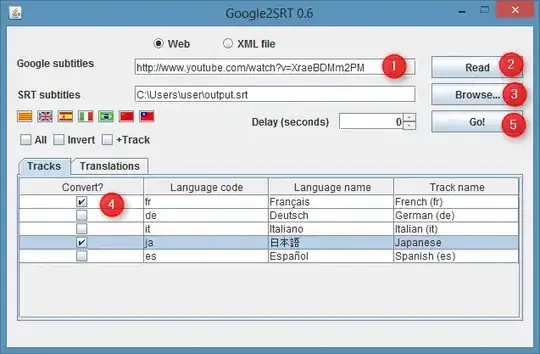
enter image description here

That Brazilian Guy
  • 6,834
  • 10
  • 64
  • 102
1

You did not specify what kind of subtitles you want to download.

If you want regular youtube subtitles in .SRT format (the most widely supported by players) then you would use (assuming you need English subs):

youtube-dl --convert-subs srt --write-sub -sub-lang en <YOUTUBE_VIDEO_ID>

If you want auto-generated youtube subtitles then you need to use instead:

youtube-dl --convert-subs srt --write-auto-sub --sub-lang en <YOUTUBE_VIDEO_ID>
#                             ^^^^^^^^^^^^^^^^

To list available subtitle languages use:

youtube-dl --list-subs <YOUTUBE_VIDEO_ID>

Once you have identified the languages you want you can request multiple subs with e.g.:

youtube-dl --convert-subs srt --write-sub --sub-lang="en,de,es,zh,zh-CN,zh-TW,zh-HK,zh-Hans,zh-Hant" <YOUTUBE_VIDEO_ID>"
ccpizza
  • 7,456
  • 6
  • 54
  • 56