7

My external hdd with a single NTFS partition was accidentaly plugged out (kids!)... and is now corrupted.

Iv tried running ntfsfix - with no luck - output below..

When I look at the disk under disk management in Windows 7 it shows up as having 5 partitions 2 of which are unallocated - none have drive letters and it is not possible to set any (that option and most others are greyed out) - so I can't run chkdsk /f

Iv tried using Minitool partition wizard which was mentioned as a solution to another similar question here. It showed the whole drive as one partition, but as unallocated, and the option -- "Check File System" was greyout.

Is there anything else I could try ?


Output of fdisk -l

    Disk /dev/sdb: 1500.3 GB, 1500299395072 bytes
    255 heads, 63 sectors/track, 182401 cylinders, total 2930272256 sectors
    Units = sectors of 1 * 512 = 512 bytes
    Sector size (logical/physical): 512 bytes / 512 bytest 
    I/O size (minimum/optimal): 512 bytes / 512 bytes
    Disk identifier: 0x69205244

    This doesn't look like a partition table
    Probably you selected the wrong device.

       Device Boot      Start         End      Blocks   Id  System
    /dev/sdb1   ?   218129509  1920119918   850995205   72  Unknown
    /dev/sdb2   ?   729050177  1273024900   271987362   74  Unknown
    /dev/sdb3   ?   168653938   168653938           0   65  Novell Netware 386
    /dev/sdb4      2692939776  2692991410       25817+   0  Empty

    Partition table entries are not in disk order

Output of ntfsfix

me@vaio:/dev$ sudo ntfsfix /dev/sdb
Mounting volume... ntfs_mst_post_read_fixup_warn: magic: 0xffffffff  size: 1024   usa_ofs: 65535  usa_count: 65534: Invalid argument
Record 0 has no FILE magic (0xffffffff)
Failed to load $MFT: Input/output error
FAILED
Attempting to correct errors... ntfs_mst_post_read_fixup_warn: magic: 0xffffffff  size: 1024   usa_ofs: 65535  usa_count: 65534: Invalid argument
Record 0 has no FILE magic (0xffffffff)
Failed to load $MFT: Input/output error
FAILED
Failed to startup volume: Input/output error
Checking for self-located MFT segment... ntfs_mst_post_read_fixup_warn: magic: 0xffffffff  size: 1024   usa_ofs: 65535  usa_count: 65534: Invalid argument
OK
ntfs_mst_post_read_fixup_warn: magic: 0xffffffff  size: 1024   usa_ofs: 65535  usa_count: 65534: Invalid argument
Record 0 has no FILE magic (0xffffffff)
Failed to load $MFT: Input/output error
Volume is corrupt. You should run chkdsk.

Options available with MiniTool:
enter image description here

Related questions:

How to fix a damaged/corrupted NTFS filesystem/partition without losing the data on it?

Repair corrupted NTFS File System

volting
  • 227
  • 1
  • 3
  • 10
  • Wow. That's just nasty... this is by no means an answer, but I think you may have to end up biting the bullet on this one and just repartitioning the entire drive. Any other thoughts? – UtahJarhead Oct 07 '12 at 20:30
  • I think I will have to.. I just thought Id ask here beforehand - I have almost 1.5TB of data on there :( fortunately I don't have any important documents or photos.. – volting Oct 07 '12 at 20:43
  • Give this topic a day or two and wait to see if any positive answers show up. – UtahJarhead Oct 07 '12 at 20:58
  • @volting - with minitool partition magic, did you try / can you assign a drive letter to the partition? – Carl B Oct 07 '12 at 21:07
  • @UtahJarhead - Thanks, Was planning to... :) – volting Oct 07 '12 at 21:41
  • @CarlB - Nope afraid not. Added a screenshot of MiniTool to my answer showing the available options. Not many! – volting Oct 07 '12 at 21:42
  • If any of the data needs to be retrieved, maybe you can try NTFS data recovery software? – Karan Oct 07 '12 at 21:50
  • @volting - Those options are to modify. You want to Create. That is important one for this. That is not greyed out in your attached image. It is above the delete option and below the explore option. Click that, it should pop up a dialoge box to create and assign a drive letter. Make sure that on the minitool wizard that you click the apply arrow in the top left to complete the task. – Carl B Oct 07 '12 at 21:51
  • @CarlB - That option is to create a new partition – volting Oct 07 '12 at 22:13
  • Try testdisk, I've seen it doing miracles with messed up partitions. – gronostaj Jun 19 '13 at 19:01
  • Before you attempt to repair anything, copy the entire raw drive content, in case you do something harmful! Something seems to have trashed the partition table. My first idea is to scan for file system headers in the first ~100 MB with a toolbox like Testdisk. – David Foerster Nov 25 '13 at 23:35

3 Answers3

1

As you have indicated that you have installed Minitool partition wizard , let's use it.

With Minitool partition wizard open:

  • Right click the drive volume that is unallocated
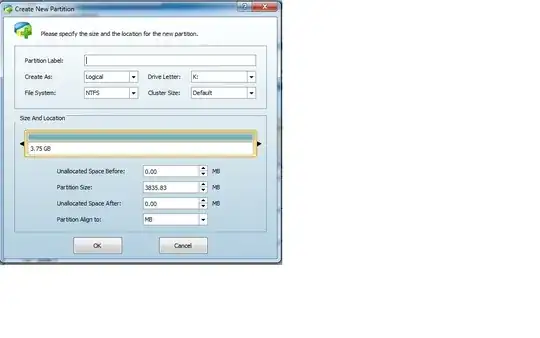
  • Select Create from the options listcreate
  • you will get a pop up box like this, (Name the volume if you like)click OK

create2

  • you will see an operation pending to create at the bottom. click the Apply check mark to executecreate 3

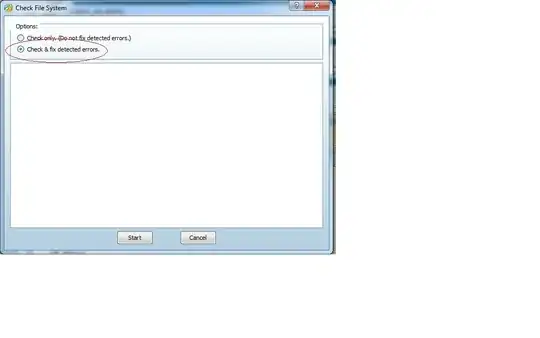
  • Right click on the newly created volume and select Check File System

    create4

  • When box pops up, select Check & Fix detected errors and click Start.create5

Carl B
  • 6,660
  • 16
  • 46
  • 66
  • Good answer - but there was no need to go to so much trouble :)- I just thought that creating a new partition would wipe whats already there - but at this point I don't think It matters.. Ill give it a shot! – volting Oct 07 '12 at 22:23
  • Great now I have one big partition with NO DATA! – volting Oct 07 '12 at 22:27
  • LOL - No reply eh! Sorry got to downvote this as it is not a solution. -Maybe I didn't make it clear that I want'd to save my data.. but I thought that would be a given. – volting Oct 08 '12 at 07:06
  • @volting - My appologies. You had noted in your comments that there was nothing important like pictures or docs. – Carl B Oct 08 '12 at 14:31
  • @volting - you can use data recovery from the same minitool company to recover data. free edition link. http://www.powerdatarecovery.com/download.html – Carl B Oct 08 '12 at 14:40
0

All is not neccessarily lost. I do not know how minitool works, but if it has re-written the partition table only, and not zero'd out the disk and destroyed the previous MFT backup, your data may be there UNTIL YOU WRITE OVER IT - so DO NOT copy any data to the disk.

Get testdisk. It has the best chance of re-instating the partition table to the original layout.

I would suggest also, do not use NTFS for removable drives. If you must have windows-readable: exfat does not (practically) limit your file size.

user657451
  • 278
  • 1
  • 7
0

I notice you say you "can't run chkdsk /f" - do not try doing it from a running instance of windows.

Get alternate recovery/install/boot media (CD, USB) and boot from that, that way all filesystems will be unmounted and unmolested by windows. You will be looking for a "drop to shell" or "boot cmprompt" option (varies by release) There will be step-by-steps available for the googling, for whatever media you have.

user657451
  • 278
  • 1
  • 7