I'm looking to draw free-hand lines in Omni-graffle - and then possibly embed them into existing items. Is there a tool/method for doing this, and if so, what is it?
Asked
Active
Viewed 1.3k times

5 Answers
4
OmniGraffle is vector-based, which means that every line, every box, et cetera, is composed not of pixels (i.e. individual dots on the screen), but a mathematical representation thereof. For example, a line goes from point X to point Y on the screen, or a Bezier curve can be described by parameters defining the radius of the curve, et cetera.
This allows you to render the file at any resolution you want, because the vectors describe relative sizes, which can be scaled to any absolute output size.
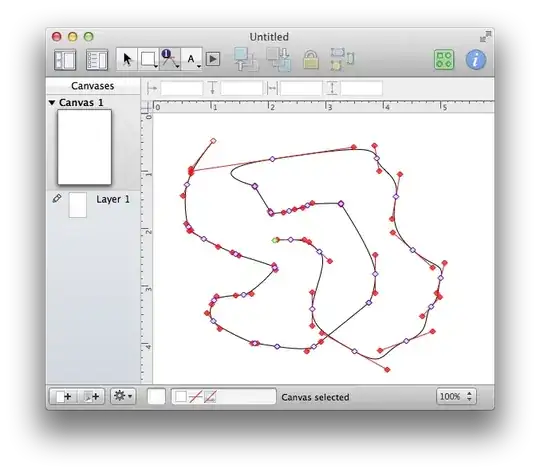
For this reason, you cannot draw free-hand lines, since they couldn't be represented as vectors. The best alternative would be to simply use Bezier curves:

slhck
- 223,558
- 70
- 607
- 592
-
7It's not really true to say this is the reason why you cannot draw freehand lines, as other vector drawing packages such as Inkscape and Illustrator do allow you to draw freehand, with your strokes converted to vectors afterwards. The real reason is simply "they didn't consider this feature important enough to implement in what is essentially more of a charting and wire framing tool than an illustration tool". – calum_b May 02 '14 at 11:48
4
Not true - you can draw a detached line.
In short, option-click when drawing a line.

Lance Roberts
- 8,563
- 9
- 49
- 79

phips
- 51
- 1
-
1This is not what the OP is asking for. Of course you can draw straight lines. Holding `option` will only prevent the line from attaching to other elements. – slhck Oct 07 '13 at 11:31
-
-
@LanceRoberts This still doesn't make the answer any more correct. Please read the question again. The OP wants free-hand lines. Not straight lines. Whether they're detached from existing objects or not is irrelevant. – slhck Oct 07 '13 at 12:08

2
If you want to freehand, draw a line. My best suggestion is to draw it freehand in Illustrator and import it to OmniGraffle.
Illustrator is vector based too and will output a vector line.
Suggest this feature to OmniGraffle, it will make many people's lives a lot easier.

0
In 7.8.1 basic none of these answers provide me with a line that doesn't attach to something unless you create the line outside of any other object.
IOW, select the line tool. Be sure the cursor is not hovering over any object. Hold the alt key, click and draw the line, with the alt key still down, double click to terminate the line.
Sadly, if you then move the line over the top of an object and click on it to position it, it will attach to that object.
As someone earlier said, this is NOT a drawing program.

John Kauai
- 11
- 2