3

So I was looking through the Windows 7 power options via Control Panel today, and I realized I had a couple of unresolved questions as to the nature of various choices. I was wondering if someone could give me a clear and concise explanation of the difference between the following four selections:

  1. Sleep Mode

  2. Hibernate Mode

  3. Standby Mode

  4. Turn off hard disks after...

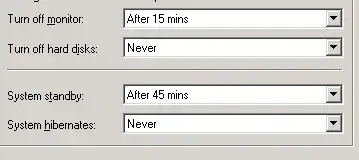
For example, regarding option 4 - does this mean that after the elapsed time limit, the computer will go into standby, hibernate, sleep, or just turn off? Below is an image of the options (albeit on a Windows XP system, but I think the same concepts should apply):
enter image description here

John Roberts
  • 155
  • 7
  • Can you please clarify what you mean by option four? Mabye posting a picture would help. – wizlog Oct 25 '12 at 02:30
  • 2
    I have posted a picture. – John Roberts Oct 25 '12 at 02:33
  • Are you sure that's from Win7 and not XP? – Karan Oct 25 '12 at 02:40
  • Great! Here, after minutes 15 of inactivity (not moving the mouse or pressing keys), the monitor would turn off (your hard disc would still be spinning). After 45 minutes of inactivity, your computer would enter standby, the low power state I (try) to explain in my answer. Your hard disc wouldn't turn off. – wizlog Oct 25 '12 at 02:42
  • @Karan I mentioned in the question that the screen grab is from XP. I don't currently have access to my Windows 7 machine, but one needs only to go to "Configure Advanced Settings", or something of that nature, to access the equivalent "Turn off hard disks" option in Win 7. – John Roberts Oct 25 '12 at 02:43
  • Ah yes, I missed that part where you mentioned XP. In any case when you talk of terminology, Standby is no longer available as of Vista. Read [this article](http://windows.microsoft.com/en-US/windows-vista/What-happened-to-standby-and-hibernate) for an explanation of the new Sleep and Hybrid Sleep modes. – Karan Oct 25 '12 at 02:59
  • Would it make sense to id the states by OS? Sleep is Vista & win7 (Win8?), Stand by is 98 & XP. There will not be a stand by AND sleep option to pick from on one OS(although they do the same thing in each OS) – Carl B Oct 25 '12 at 03:27
  • @Carl: Actually, Sleep and Standby are almost the same but not quite. Windows transitions Sleep to Hibernate if battery charge gets critically low. See the "Will sleep eventually drain my laptop battery?" section in the FAQ wizlog linked to. – Karan Oct 25 '12 at 03:43
  • @Karan- I might just have fuzzy eys, i do not see that sleep transistions to hibrinate. In any event, sleep and system stand by would not exist on the same OS. It could on the same computer if there was a dual boot of say xp and win 7, but to each respective OS that happens to be active at that time. ;) – Carl B Oct 25 '12 at 04:03
  • @Carl: It says "Sleep requires an extremely small amount of power. If your laptop battery charge gets critically low while the computer is asleep, *Windows automatically puts the laptop into hibernation mode*." While both Sleep and Standby do not exist in the same Windows version, AFAIK Windows did not similarly transition Standby to Hibernate when the battery charge was critically low. – Karan Oct 25 '12 at 06:22

1 Answers1

4

I'll try my best to simpify this as best I can.

Sleep and standby mode keeps the computer on in a low power state, and allows you to quickly resume what you were doing. Hibernate shuts down or hibernates your computer and saves all your open windows, so when you log back in you can resume what you were doing.

Shutdown closes all programs, and powers off the computer. Nothing open is saved, and the computer needs to fully boot up (load your startup programs...) when you turn it back on.

On Windows Vista (probably also 7,8) sleep is the same as standby, until the battery gets very low, then it automatically hibernates.

Turn hard discs off after... is intended for desktops to store the information both in memory (like the sleep and standby modes) and also on the hard disc in case power failure occurred. Because laptops have a battery, power failure is pretty uncommon.

Microsoft posted some helpful information on sleep and hibernation here Sleep-and-hibernation-frequently-asked-questions.

wizlog
  • 13,277
  • 24
  • 77
  • 116