What is the difference between Windows Defender on Windows 8 and Microsoft Security Essentials? They practically look alike, so is there a need to install Security Essentials?
Asked
Active
Viewed 1.4k times
8

Kirk Ouimet
- 2,715
- 8
- 37
- 56

bytecode77
- 1,111
- 5
- 22
- 42
-
1This is not a duplicate as the Windows Defender of Windows 8 differs heavily from the one in Windows 7 and this is a Windows 8 related question. – bytecode77 Oct 26 '12 at 13:37
-
You are exactly right. This closed-as-duplicate reason is fallacious. – Chris W. Rea Oct 27 '12 at 17:42
2 Answers
9
Security Essentials was integrated into the system on Windows 8 and does not need to be installed.

Michael K
- 3,428
- 4
- 25
- 44
-
That means Security Essentials is obsolete and will only be useful to Windows 7 (and below) users, right? – bytecode77 Oct 26 '12 at 08:35
-
1
-
@MichaelK do you have a source for this? Just curious on reading up on it – Kirk Ouimet Nov 01 '12 at 06:48
-
@Kirk take a Windows 8 and try to install Security Essentials with the setup from their website. Then it will tell you. – Michael K Nov 01 '12 at 08:20
7
Windows Defender for Windows 8 and Windows RT provides the same level of protection against malware as Microsoft Security Essentials. You can't use Microsoft Security Essentials with Windows 8, but you don't need to — Windows Defender is already included and ready to go. But if you’re looking to protect a PC with an older version of Windows, you can use Microsoft Security Essentials to help guard against viruses, spyware, and other malicious software. It provides free real-time protection for your home or small business PCs.
When you try to install the MS Essentials on your Windows 8 then you will get a popup message from Program Compatibility Assistant
This program has a compatibility issues
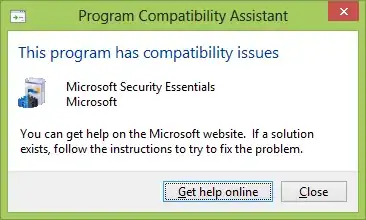
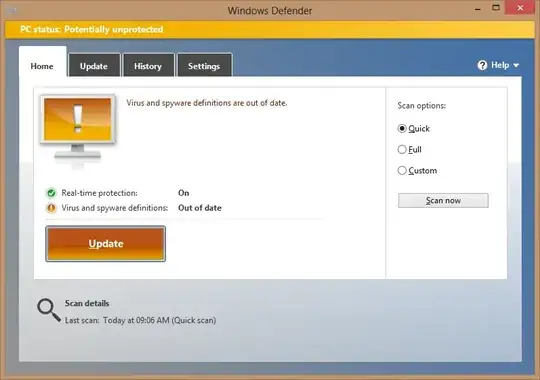
As we can see Windows 8 come along with Windows Defender which has the same feature as MS Essentials has on older Windows.
You have to update it like MS Essential to keep your system protected.
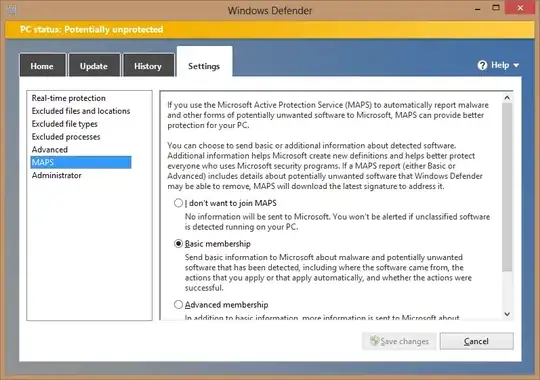
You have the setting options like MS Essential.
I'm just looking a new feature Microsoft Active Protection Service(MAPS) in the settings tab or may be its already there and I noticed it now.
Only they are giving a lack of integration of right click and scan a file/folder/drive which you can achieve with a registry hack. For this read my question here.


-
MAPS is the new name for Microsoft SpyNet, which I'm pretty sure used to be in MSSE...but then I've been using ForeFront Client Security/System Center Endpoint Protection for some time now and they both definitely have it – Graham Wager Nov 01 '12 at 09:11
-
-
@Kirk you will get that warning(as shown in image) in Windows 8 when you will try it to install. – avirk Nov 02 '12 at 06:09