I just got my Microsoft Surface Tablet. So far it rocks, but I would like to be able to get to the main screen that shows date/time and background image (or, the "Lock Screen"). Thus far I have only been able to get there by hitting the power button twice. Is there a way to get there without hitting the power button?
Asked
Active
Viewed 8,382 times
10

-
2Currently there are two excellent answers. How does one go about deciding the answer to accept? – GaTechThomas Oct 26 '12 at 16:37
-
2Whichever you prefer! Generally, if multiple answers solve my problem, I choose whichever I think will be most useful to future visitors. – Matthew Oct 26 '12 at 16:42
2 Answers
9
What is called the Lock Screen is available using the profile icon in the top right corner of the Start screen. Simply click it and click "Lock":
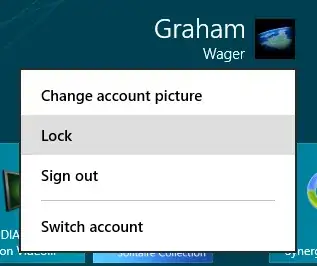
Alternatively, if you have a keyboard attached, Windows+L will end in the same result.

Graham Wager
- 11,647
- 3
- 30
- 50
7
This screen is called the "Lock Screen". It is shown when your computer is locked.
To lock your computer, you can:
- Go to the start screen, click your name in the top-right corner, and choose "Lock".
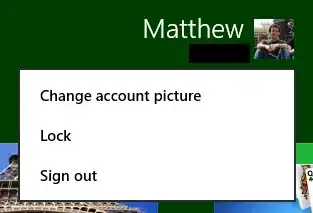
- Or, press Windows + L.
You can customize your lock screen through the "Personalize" settings page.
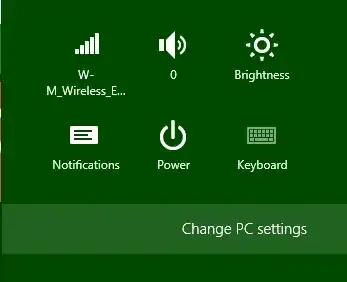
First activate the "Settings" Charm and choose "Change PC Settings":
Then select the "Personalize" page:

Matthew
- 14,496
- 18
- 73
- 119
-
What if I don't have the keyboard attached and want to use the touch screen? – GaTechThomas Oct 26 '12 at 16:21
-
-
Hmm, I thought I commented on the other answer in my question about using the touch screen. – GaTechThomas Oct 26 '12 at 16:36
-
1@GaTechThomas: Nope you were right, you commented right before I added non-keyboard methods to my answer, when this was the only answer :) – Matthew Oct 26 '12 at 16:39
-
2@Matthew Like how both our Start screen screenshots feature Solitaire Collection ;) – Graham Wager Oct 26 '12 at 17:23
-