I obtained a licence key for Windows 8 through DreamSpark. Is there a way to download a Windows 8 ISO image like you could for Windows 7? I am on a non-Windows machine, so I cannot use the Secure Download Manager to download Windows 8 directly using DreamSpark.
Asked
Active
Viewed 2.5k times
44


-
1Doesn't dream spark offer a regular html download? they use too... – TheXed Oct 27 '12 at 02:20
-
No, they don't offer a regular html download. For downloading windows 7, the following post http://superuser.com/questions/78761/where-do-i-download-windows-7-legally-from-microsoft has the links to it. So I am looking something similar for windows 8. – Ishan Oct 27 '12 at 03:36
-
I completely feel your pain. Their "secure download manager" is so terrible. However, if you give Microsoft a bunch of money and get MSDN you get good ol' HTTP downloads – Earlz Nov 08 '12 at 21:54
-
1There are torrents of official ISOs available on the internet. Just google the filename. Remember to check the SHA1 afterwards to ensure that you have the genuine file! – kinokijuf Apr 24 '14 at 11:27
-
@kinokijuf likely those images are marked and won't work, even with a legal key. – Joshua Nurczyk Apr 27 '14 at 21:14
-
@JoshuaNurczyk what do you mean by “marked”? – kinokijuf Apr 27 '14 at 22:05
-
There are checksums and such on each Windows install disk, starting with I think Vista. This helps MS track which ISOs have been shared as well as limiting which keys will work with that specific ISO image. This means the HP OEM ISO can only be installed on certain HP hardware IDs. – Joshua Nurczyk Apr 27 '14 at 22:17
-
1Same question for Windows 7: http://superuser.com/questions/78761/where-can-i-download-windows-7-legally-from-microsoft – Wilf Feb 17 '15 at 22:25
-
http://windows.microsoft.com/en-us/windows-8/create-reset-refresh-media – Wilf Feb 21 '15 at 22:02
5 Answers
20
My order confirmation says:
If you need to download Windows, write down your new product key and enter it here.
And it links to the Windows Setup.exe.
Additionally, there's this option:
Go to https://www.mswos.com/
Fill out the details of your order.
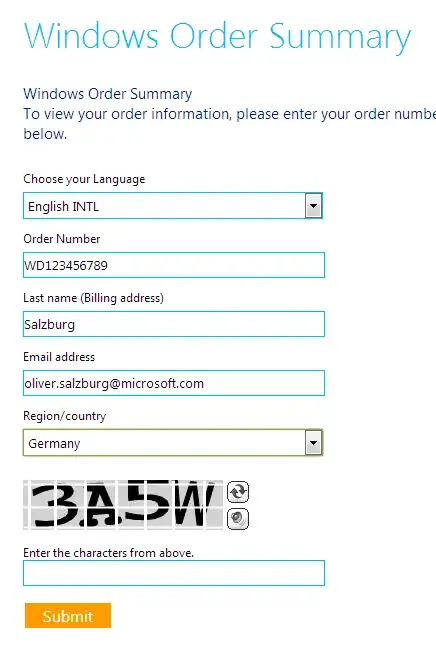
You'll find the download link at the bottom of the page.

Oliver Salzburg
- 86,445
- 63
- 260
- 306
-
Nice find but I think it would be great to have a ISO and not an EXE. I need to reformat and install Win8 and a physical DVD is essential. Where I can find an ISO ? – Warface Nov 06 '12 at 15:12
-
@Warface: The installer allows you to download an ISO after you've input your product key. At least that's my understanding of it and that's what happened when I installed my upgrade. But, yeah, a direct `.iso` download would be a lot better. – Oliver Salzburg Nov 06 '12 at 15:22
-
Yeah I just found that with this link http://www.guidingtech.com/16395/make-bootable-iso-file-windows-8-pro-after-upgrading/ Thanks – Warface Nov 06 '12 at 15:36
-
2I'm not on Windows so an EXE simply doesn't make sense. I need to install Windows 8 in a VM. – Luke Dec 07 '13 at 08:47
-
1@Luke Okay, so try the second suggestion. The download link on the site should lead to an ISO. Or use a different Windows VM to run the EXE. – Oliver Salzburg Dec 07 '13 at 09:10
-
8
Normally you can download this from DreamSpark itself, not far from where you got the key from.
Alternatively, try this URL.

Tamara Wijsman
- 57,083
- 27
- 185
- 256
8
You can download Windows 8, and a Windows 8.1 upgrade for free, direct from Microsoft, provided you have a valid product key.
Both are on Microsoft's Windows 8 upgrade, product key only site.
Complete Windows 8 ISO:
Clicking the Install Windows 8 button will download an executable installer which will download the appropriate Windows 8 ISO, based on the product key you provide.
Windows 8.1 upgrade:
Clicking the Install Windows 8.1 button will download an executable that will provide you with a Windows 8.1 upgrade installer download.
Complete Windows 8.1 ISO:
If you want to download a complete Windows 8.1 ISO, you can do so as well, but there's a little bit of a trick to it.
- At the Microsoft Windows 8 upgrade, product key only site, click the
Install Windows 8button to download the executable installer. - Run the executable installer, input your product key*, and download the appropriate Windows 8 ISO.
- Once the download starts, close the setup program.
- Return to Microsoft's Windows 8 upgrade, product key only site and this time, Click the
Install Windows 8.1button instead, this time, and it will begin to download your complete Windows 8.1 ISO. - Success!
And no, no one seems to know why the the process for downloading the complete Windows 8.1 ISO is more convoluted than getting the complete Windows 8 ISO.
*As noted in the answer here, The Windows 8 downloader for the ISO will not accept Windows 8.1 product keys, so you will have to use a generic placeholder key (334NH-RXG76-64THK-C7CKG-D3VPT for Core, XHQ8N-C3MCJ-RQXB6-WCHYG-C9WKB for Professional) if you only have a Windows 8.1 license. This placeholder key will not let you activate Windows, so this is key will simply allow you pass the key check on the Windows 8 downloader, and allow to proceed to downloading the Windows 8.1 ISO.


HopelessN00b
- 1,882
- 3
- 21
- 29
-
3@StevenPenny Well, good luck with that, then - the bounty is going to go to waste. Because unless you have a [volume licensing agreement and access to the MS volume licensing site](https://www.microsoft.com/Licensing/servicecenter/default.aspx), you can't **legally** download a Windows 8 ISO without downloading the exes first. Microsoft uses those exes to enforce their licensing (by restricting the downloads to those with a valid product key), and they don't make the ISO downloads available to the general public otherwise. – HopelessN00b Apr 25 '14 at 01:02
-
2@StevenPenny His answer meets the bounty restrictions. You say "if possible" no EXEs. Well, it isn't and therefore his answer fulfills your request. – Jacob Apr 25 '14 at 01:17
-
1@StevenPenny You can get direct ISO downloads with an MSDN subscription, but those are tied to your account and the links won't work for the general public anyway. I think this answer is about the best you can do. But who knows, someone _might_ come up with something better in the next few days... – Michael Hampton Apr 25 '14 at 01:24
-
2@StevenPenny Unfortunately, the only way to get a legal copy is to go through whatever method MS provides. They did not see fit to provide a plain ISO download. That is their decision, and you are welcome to ask them to reconsider, but there is no other way to obtain a *legal* copy of the retail edition, as far as anyone knows (barring some resellers, but they would need MS's permission anyway). – Bob Apr 25 '14 at 01:42
-
There's a better way now, one that doesn't require any product keys (but still requires one to run an EXE on a Windows machine for whatever reason): the Media Creation Tool described in [this answer](http://superuser.com/a/747579/7076). – RomanSt Apr 13 '15 at 13:56
6
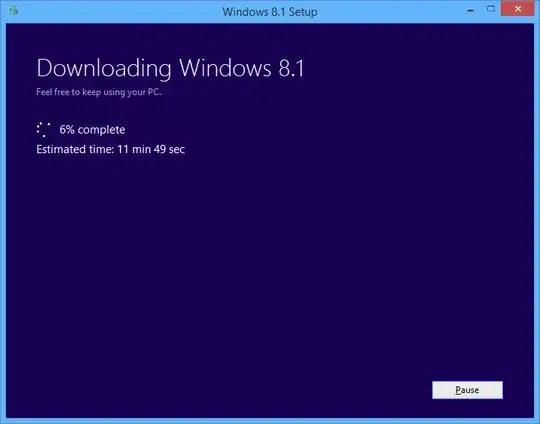
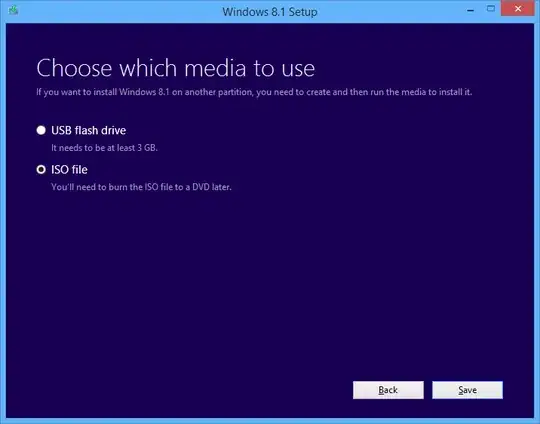
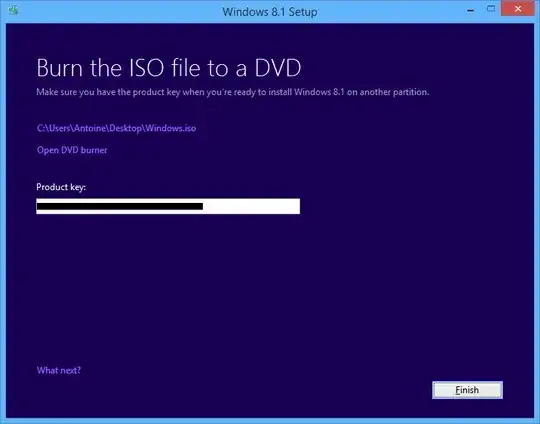
If you have a computer which has already Windows 7 or later, you can use this official tool to create a Windows 8.1 installation media.
All you need to provide is your product key. The tool will download the installation files, and you will be able to create an ISO file, then burn it to a media.


Ob1lan
- 1,906
- 3
- 18
- 35
-
1This solution is already explained in the accepted solution. This also only works with non OEM versions of Windows 8.1. You would be unable to use this method with an OEM license. – Ramhound Apr 30 '14 at 09:52
-
2
-
2Great for those already on Windows, impossible for those who are not. They know how to make it difficult, don't they... – RomanSt Apr 13 '15 at 13:55
0
Here is a magnet link you can use to download a clean image from Microsoft.
magnet:?xt=urn:btih:482ee377843fb4f7c28dc74a88f556bcd86d1a98&dn=Windows-8-Pro_64-bit
You can learn how to use magnet links to download torrent files here: http://dev.deluge-torrent.org/wiki/Faq#HowdoIsetDelugeasmydefaultprogramforMagnetURIs
Remember to include everything including the word "magnet"

Gabriel Fair
- 3,605
- 12
- 35
- 65
-
I assume everything after the colon is the link? How does one use it? – fixer1234 Apr 02 '16 at 20:50
-
No include the entire line. Even the word magnet. You will need a bittorrent client to download it. http://dev.deluge-torrent.org/wiki/Faq#HowdoIsetDelugeasmydefaultprogramforMagnetURIs Please upvote my answer if you found it useful. Thanks – Gabriel Fair Apr 05 '16 at 10:56
-
2It still isn't clear how to accomplish your solution. Can you expand your answer with full, detailed instructions? Thanks. – fixer1234 Apr 05 '16 at 18:58