Just installed Windows 8, pinned Notepad to the start screen. When I press the Windows key and use the Notepad tile to run Notepad, it will focus on the currently open Notepad window. I'd like it to start a new instance of Notepad. Is this possible?
Asked
Active
Viewed 2,958 times

4 Answers
17
Use the Shift key to start a new instance of any application. Either Shift+Enter or Shift-Click, or else middle click.
Source: http://codeyarns.com/2012/10/22/start-multiple-instances-of-an-application-in-windows-8/
Other taskbar modifiers include:
Shift+Click         Open a new instance of the program
Ctrl+Click          Cycle between windows in a group
Middle Click        Open a new instance of the program
Ctrl+Shift+Click    Open a new instance of the program as Administrator
Shift+Right-Click   Show window menu

Ashwin Nanjappa
- 9,947
- 26
- 79
- 110

ronalchn
- 4,541
- 3
- 26
- 32
-
2Came here to say this, I always use Middle-Click to open a new instance, it works in Windows 7 too. – Mark Allen Oct 27 '12 at 06:33
-
Ctrl-click is the greatest thing ever! Thank you! – Caleb Jares Nov 07 '12 at 18:39
-
Microsoft should've made this more visible. I've searched for standard windows hotkeys and never found these earlier. Will use these a lot from now on. – Henrik Karlsson Feb 03 '13 at 14:40
13
To make it always open a new window with a normal left click, change the shortcut target of the tile:
Right click on the tile
Open file location. A File Explorer window should open, with aNotepadshortcut in itRight click on the
NotepadshortcutClick properties
Change the target to
%windir%\system32\cmd.exe /c start %windir%\system32\notepad.exe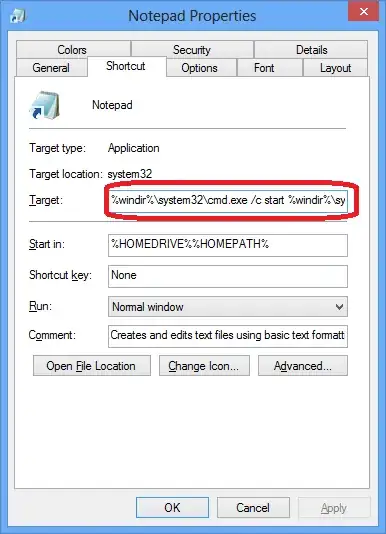


-
This works for programs that have no spaces in the path but not for something like Wordpad.exe. For that I use `%windir%\system32\cmd.exe /c start /d "%ProgramFiles%\Windows NT\Accessories" wordpad.exe`. Because the path has spaces it needs quoted, but if `start` sees quotes in the first argument it treats it as the title of the new window. Here I use the `/d` switch to specify the (quoted) path for the executable separately from the executable name. This works better for me than shift-clicking which can put new windows behind everything else--so far all new windows are on top. – User5910 Mar 02 '13 at 17:14
-
@User5910 You could (should) just put a set of empty quotes for the title - the `/d` method will fail if the executable name itself has spaces. I've actually answered a question [addressing that very issue](http://superuser.com/a/413966/117590). – Bob Mar 02 '13 at 17:20
6
It actually is possible with a reg key to do this. it only works for desktop apps (not full screen win8 apps) though i imagine this is exactly what everyone is looking to do.
[HKEY_CURRENT_USER\Software\Microsoft\Windows\CurrentVersion\ImmersiveShell\Launcher]
"DesktopAppsAlwaysLaunchNewInstance"=dword:00000001
Source here.


-
-
My searches indicate that this does not work in 8,1. The middle click suggested by ronalchn does. – TecBrat Aug 13 '15 at 08:48
-
3
Another rather tedious way to go about it is to right click on the tile & select "Open in New Window"

Sathyajith Bhat
- 61,504
- 38
- 179
- 264
-
In fact, this is usually the quickest way (for me) to make a new instance of an already running app. Opening the Start Screen, finding the app (however conveniently placed it may be) and Shift-Clicking it seems needlessly complicated (though I'm glad I've learned of it) compared to right-clicking the taskbar and clicking on "New whatever". – Vincent Vancalbergh Aug 26 '13 at 07:46