8

Running Mac OS X, using either Terminal.app or iTerm2, there is a strange artefact with the character rendering that I have a hard time explaining and an even harder time understanding. I'll start with a video of my screen so that you can see and example of it in action:
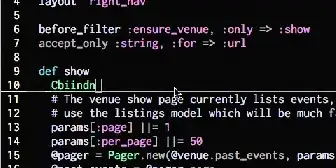
Strange terminal vim rendering

From the video you can see a few ways it is weird, for example, sometimes when I hit a letter in insert mode, the character is double printed. When I go into normal mode, the artefact remains. When I re-enter insert mode, hitting backspace copies the characters on the left to the position under the cursor.

This has happened in OS X Lion, and Mountain Lion, under both Terminal.app and iTerm 2. This never happens under MacVim.

Also, I use GNU/Linux on my other machine, and have never had this happen, I am pretty sure it is strictly a Mac OS X issue, but I do not know how to fix it. For a while, I've been working around it by using MacVim most of the time, but I prefer working in a terminal.

Does anyone know what is happening here, and if so, how can I fix it?

EDIT: I tried using the macvim Vim executable, and I still get strange artefacts, but they are localized to the left side of the screen, here is an example:
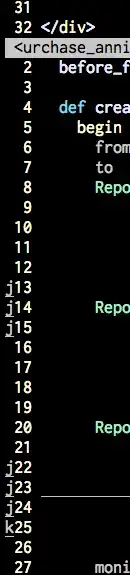
enter image description here

tlehman
  • 283
  • 3
  • 8
  • What encoding do you use? In Vim and in the terminal? What is your `$TERM`? What font do you use? Does it happen when you use `nano` or some other CLI text editor? What is the version of Vim? Did you compile it? And your animated GIF doesn't seem to work embedded. – romainl Oct 28 '12 at 20:33
  • Encoding: UTF-8, $TERM=xterm-256color (in terminal) and dumb (in MacVim). Font is Inconsolata, size 18. About nano, I have not been able to reproduce the same problem in nano. Both versions of vim are 7.3. And I compiled MacVim using the homebrew package manager, but console vim is system default, I didn't compile that. – tlehman Oct 29 '12 at 02:33
  • I think that Homebrew overwrites the system Vim. Are you sure that you are using the default Vim and not MacVim's CLI executable? – romainl Oct 29 '12 at 06:39
  • I am sure I am using the default vim, and not homebrew's vim. For one, `which vim` gives `/usr/bin/vim`. Also, `ls -l /usr/bin/vim` shows that it is not an alias to something in `/usr/local/bin` which is what Homebrew uses. And finally, the modified date on the `/usr/bin/vim` file is before I installed homebrew, so it is definitely the system default. – tlehman Oct 29 '12 at 19:32
  • Ok, do you see the same behaviour when you use the Macvim executable in the terminal? – romainl Oct 29 '12 at 20:10
  • How do I use the macvim executable? – tlehman Oct 29 '12 at 20:11
  • From the path you gave in your previous comment I'd try `$ /usr/local/bin/MacVim.app/Contents/MacOS/Vim`. – romainl Oct 29 '12 at 20:15
  • I found it in `/usr/local/Cellar/macvim/7.3-65/MacVim.app/Contents/MacOS/Vim`, I'll use that, and I'll update this in a little bit. – tlehman Oct 29 '12 at 21:39

2 Answers2

0

Total shot in the dark: do you have the following line in your ~/.vimrc?

set list listchars=tab:\ \ ,trail:

Try commenting it out with a " at the beginning of the line and restarting vim.

I picked it up from somebody's dotfiles repo and haven't had a chance to track down why it's causing problems.

I'm running iTerm2. My $TERM is xterm. Hope that helps.

drhayes
  • 101
  • 3
0

This may be related to getting the Git branch to put in status line using the following function in ~/.vimrc:

system("git branch 2> /dev/null | sed -e '/^[^*]/d' -e 's/* //'")`
random
  • 14,638
  • 9
  • 54
  • 58
jimmay5469
  • 101
  • 1