21

I have enabled fast boot in my copy of Windows 8 but I would like to be able to specifically instruct Windows not to perform a "fast shutdown" whenever I want (without disabling fast boot altogether).

I need to be able to do this because I dual-boot Ubuntu and therefore can't mount an NTFS partition as read/write if Windows has performed a "fast shutdown". (Well okay, I can force the partition to be mounted read/write, but then I could run into data loss/corruption problems.)

Nathan Osman
  • 2,742
  • 11
  • 46
  • 66
  • Check the arguments for shutdown.exe, and also see [this](http://superuser.com/questions/491150/what-does-a-hybrid-boot-do-and-why-wouldnt-i-always-enable-it), [this](http://superuser.com/questions/494861/how-to-add-a-shutdown-tile-windows-8-modern-ui) and [this](http://superuser.com/questions/468687/hybrid-shutdown-in-windows-8-rtm) among others. – Karan Oct 29 '12 at 07:11

5 Answers5

15

An easier way then using the command prompt might be the following:

A full system shutdown is performed by pressing the Shift key at the same time as selecting the shutdown option.

Windows 8 / Windows Server 2012: Faster Boot Process

user216689
  • 151
  • 1
  • 2
11

You can run shutdown -s -t 0 for a normal shutdown and shutdown -s -hybrid -t 0 for a hybrid shutdown.

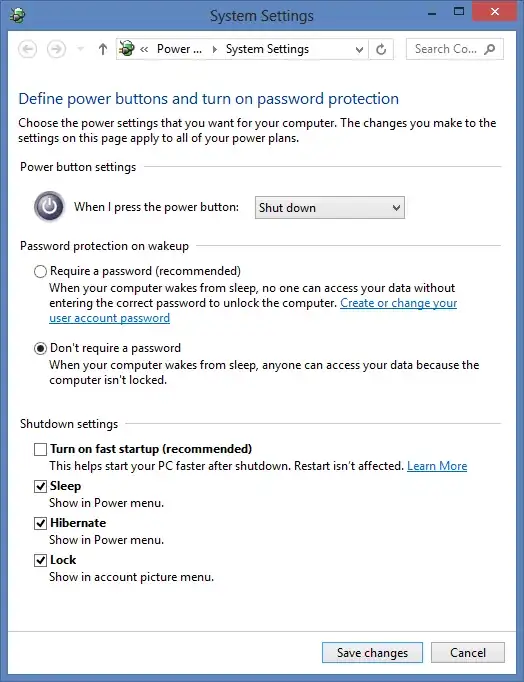
If you always want to do a normal shutdown, follow these steps:

  1. Press the Win + W.

  2. Type change power buttons and press Enter.

    S2

  3. Click Change settings that are currently unavailable.

    S3

  4. Uncheck Turn on fast startup.

    S4

  5. That's it.

Elmo
  • 14,555
  • 17
  • 52
  • 90
  • 3
    He said he didn't want to turn off fast startup. – Caleb Jares Oct 29 '12 at 19:24
  • 1
    -1. Your answer does not provide any new information that the previous answer and does so in a less concise way. All you added was a copy-paste from [your other answer](http://superuser.com/questions/494965/wake-on-lan-doesnt-work-in-windows-8), which the OP wasn't interested in. – Caleb Jares Oct 29 '12 at 19:27
  • Your commands in your answer is incorrect. Check it properly. – Elmo Oct 30 '12 at 06:10
5

Use shutdown /s for a regular shutdown. Use shutdown /hybrid for a fast-boot shutdown.

More information on the shutdown command.

Caleb Jares
  • 2,649
  • 3
  • 19
  • 29
  • 1
    Are you sure that /s does a full shutdown even when you have fast startup activated? I don't think that the documentation is perfectly clear. The /s documentation just says "Shutdown the computer", not "Full shutdown" like it says under /r. Also, when I measure shutdown times on my computer with a stopwatch, there is no measurable difference between "/s" and "/s /hybrid". – Klas Mellbourn Nov 04 '12 at 07:44
3

From the Charms bar:

Settings -> Power -> Shift + Shut Down

This disables the 'fast start-up' for the next Windows 8 Session.

Semantically, this tells windows Not to write a hibernation file to disk. Having a hibernation file saved on a Windows NT partition will cause partition mouing tools to fail (as to not corrupt the partition by accident.)

Source: http://www.hecticgeek.com/2013/01/mount-windows-8-partition-ubuntu-hybrid-boot/

ThorSummoner
  • 1,130
  • 1
  • 15
  • 25
2

shutdown /s performs a full shutdown. I am not basing my response on having timed startup (versus shutdown /s /hybrid). Rather, I noted that every time I shut down normally, the PendingFileRenameOperations registry value is not processed. I just used shutdown /s with lots of files to process under PendingFileRenameOperations. After having started Windows 8 again, PendingFileRenameOperations has been emptied. This means a full shutdown was performed.

Scott
  • 21
  • 2