6

Windows 8 has got a new feature that allows you to login to your computer using a 4-digit PIN code:
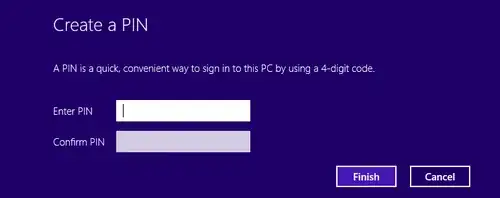
enter image description here

  1. Over the years we've been taught that we should always protect our accounts with secure passwords that consist of both lower- and uppercase letters and digits and have a length of at least 7-10 characters. The new PIN policy contradicts with this idea.

  2. If we're actually able to set a 4-digit password (and in Windows 8 we are), how is that different from the PIN-code? In my opinion, the PIN actually tells the intruder "hey, the owner only used a 4-digit password, so use the alphabet of 0-9 for your brute-force attack, it will be much faster".

  3. To have a more convenient way to sign in, we can also set a 3-, or even a 2-digit password, which is not possible for a PIN code.

So what is the exact purpose of the feature, if it's definitely less secure and not more convenient than the good old password?

Vladimir Sinenko
  • 2,685
  • 6
  • 26
  • 33
  • If you've enabled it, could you see if it "locks-out" after a certain number of wrong attempts? And what happens in that situation - does it revert to password only, or just a timed lock? – Graham Wager Oct 29 '12 at 11:34
  • 1
    Yes, I've just tried it and it asks for a password after 5 wrong attempts. This is also true for a picture password (described in the article provided by @Root) – Vladimir Sinenko Oct 29 '12 at 11:35
  • That's good, not as bad for brute force at least :) thanks for that! – Graham Wager Oct 29 '12 at 11:38
  • PINs also cannot be used remotely, i.e. to access network shares. – fefrei Aug 01 '15 at 19:33
  • One more fact, overlooked so far: PIN logon carries proxy authentication. For example, laptop's fingerprint reader cannot be enabled unless a PIN is enabled beforehand. After expiration of PIN, fingerprints do not work for logon any more – tested. Therefore it appears that 3rd-party devices are allowed to memorize the PIN (or refer to it internally) without knowing actual system password. This is a measure of keeping the system password unpublished while still allowing other devices to logon, but not without the PIN. Without the PIN, such a logon procedure would be vulnerable to random calls. – miroxlav Mar 09 '23 at 12:33

2 Answers2

4

When you use a tablet, the PIN password pops up the numeric keyboard instead of the full-sized keyboard which makes it easier to type the password. It is similar to the Simple Password feature in iOS.

Quote from Building Windows 8 blog:

In a world with increasingly strict password requirements—with numbers, symbols, and capitalization—it can take upwards of 30 seconds to enter a long, complex password on a touch keyboard.

Other touch experiences in the marketplace have tried to tackle this problem, with the canonical example being a numeric PIN. A PIN is a great solution: Almost everyone has seen or used one before, and a keypad is simple to use with touch. We knew though, that there was room to improve.

Also, a 4-digit PIN (which has 10 independent possibilities each) has 10,000 unique combinations.

Glorfindel
  • 4,089
  • 8
  • 24
  • 37
Elmo
  • 14,555
  • 17
  • 52
  • 90
1

So what is the exact purpose of the feature, if it's definitely less secure and not more convenient than the good old password?

Its a method to allow the user to implement a password, to avoid the casual user from viewing the contents of their tablet, just like iOS has implement similar features.

If you lose the device then you run into the fact a bruce force attack would have been sucessful eventually no matter WHAT your password was. Clearly its not as secure as a normal password, but secure enough, which is fine for 90% of the cases somebody would turn this feature on.

Ramhound
  • 41,734
  • 35
  • 103
  • 130