Possible Duplicate:
How do I shutdown Windows 8?
The only method I could find out while usage is drag to top right, then go to settings, click on power button and click again on shutdown. Sounds too much.
Possible Duplicate:
How do I shutdown Windows 8?
The only method I could find out while usage is drag to top right, then go to settings, click on power button and click again on shutdown. Sounds too much.
Press the on/off switch.
Credit Scott Hanselman

You can make a tile in the start menu for a Windows 8 shutdown.
Step 1: Right-click on a open area of your desktop, then go to New and select Shortcut.
(Credit: Screenshot by Ed Rhee/CNET)
 Step 2: In the location box, type shutdown /p to shut down Windows 8 immediately or shutdown /r /t 0 to reboot Windows 8 immediately. Click Next to continue.
(Credit: Screenshot by Ed Rhee/CNET)
Step 2: In the location box, type shutdown /p to shut down Windows 8 immediately or shutdown /r /t 0 to reboot Windows 8 immediately. Click Next to continue.
(Credit: Screenshot by Ed Rhee/CNET)
 Step 3: Type a name for your shortcut, then click the Finish button.
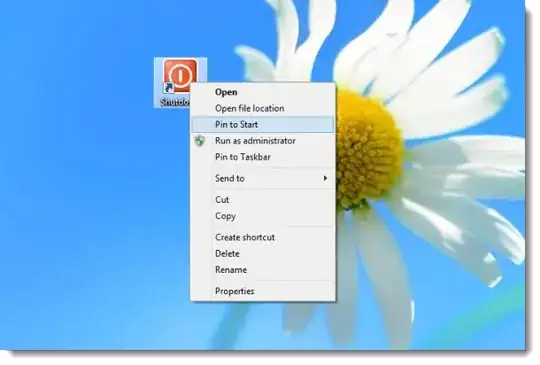
Step 4: Right-click on the shortcut from your desktop and select Pin to Start.
(Credit: Screenshot by Ed Rhee/CNET)
Step 3: Type a name for your shortcut, then click the Finish button.
Step 4: Right-click on the shortcut from your desktop and select Pin to Start.
(Credit: Screenshot by Ed Rhee/CNET)
 Step 5: Go back to the Start screen and verify that your new shutdown tile appears.
Credit: Cnet

You can use WIN + D to go to desktop followed by ALT + F4

If you've got a keyboard then WinKey + i brings up the settings and you can tap the bower button from there.


