In Windows 8, is it possible to create shortcut of a file on the new Start screen with Live Tiles? If so, how is it done?
Asked
Active
Viewed 1.4k times

5 Answers
8
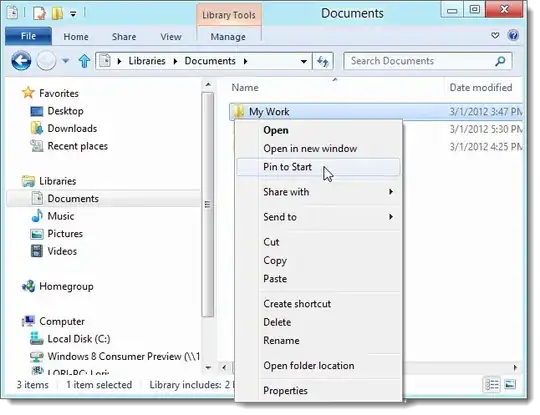
To create a shortcut to a file in Windows 8's new Tiles, simply go to Windows Explorer, right-click your file, and click Pin to Start.

Ethan Lee
- 485
- 1
- 3
- 19
-
This works for folders, but not files. The "Pin to Start" option is not available. – Daniel Schilling Sep 10 '13 at 21:05
3
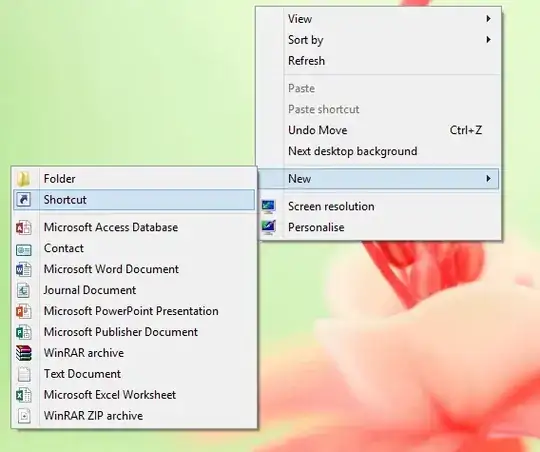
- Right click on the Desktop, and select New->Shortcut.
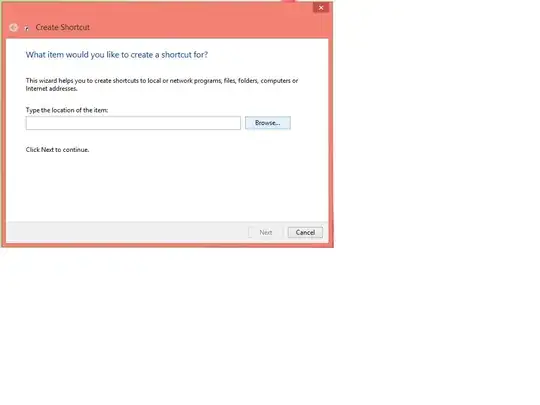
- In the Create Shortcut Window that pops up, Browse and select the file whose shortcut you want to create.
- Finally right click on the created shortcut and select Pin to Start.

Rakib Ansary
- 2,208
- 3
- 16
- 31
-
1This works for shortcuts to applications, but not for shortcuts to files. The "Pin to Start" option is not available on shortcuts to files. Your example is for eclipse.exe, an application. – Daniel Schilling Sep 10 '13 at 21:07
1
I have found a great article on the same. I don't think I need to explain anything else.
http://www.howtogeek.com/74331/how-to-create-your-own-windows-8-shortcuts-for-shutdown-perhaps/
Just consider creating your own shortcut instead on shutdown mentioned here.

DOM
- 532
- 2
- 4
- 13
-
4
-
1This is the only correct answer so far (aside from the Pin to 8 app - I haven't tried that). None of the other answers work for files, but this one does! I was able to pin an *.xlsx speadsheet to Start using this method. – Daniel Schilling Sep 10 '13 at 21:14
-
To summarize, you use the "Search Apps" feature from the main (tiled) screen itself, then right-click to pin the search result. You may need to create a shortcut first, and search for that. – Jon Coombs Sep 09 '15 at 21:19
0
You can use this tool to pin ANY type of data:
http://winaero.com/comment.php?comment.news.140
With our Pin to 8 you will able:
to pin ANY file regardless of its type;
to pin ANY folder;
to pin drive;
to pin Control Panel items, all them including some hidden like God Mode/All Tasks, Network Connections;
to pin Libraries;
to pin Shell Objects like Run command, "Show Desktop", Window Switcher;
to pin any folders or files with drag and drop. Drop them on application window

magicandre1981
- 97,301
- 30
- 179
- 245
0
Easier, less expensive: use the desktop to create your short cut. Drage it (copy) it to where you want it to work. You may have to 'allow' it as administrator if you are not in the admin account.

Eloh
- 1