Just switched to Windows 8 and I noticed that the colors on some webpages are not the same as on my old laptop. On Windows 8 they look pale and I wonder if there is a problem with the depth of the colors or bad configuration on my OS. Is there somewhere where I can check my graphic card configuration or tweak the color confs?
Asked
Active
Viewed 1.1k times
4

-
7You say that they are different from your **old laptop**, so I'm assuming this is a completely different computer. Different monitors typically display colors slightly differently, so it is likely a "problem" with your monitor's color calibration, not Windows 8. There's a guide on doing so [here](http://digital-photography-school.com/how-to-calibrate-your-monitor), though many other options are available. – Tanis.7x Nov 09 '12 at 17:45
-
The new laptop is supposed to have a better hardware (Lenovo U410 vs old Lenovo Y560). – Armand Nov 09 '12 at 17:50
-
3@Armand - The color reproduction of LCDs is a fickle thing, and not at all related to the quality of the rest of the system sometimes (especially with Lenovo which has a bad habit of using lousy LCDs even in $3000 laptops...) – Shinrai Nov 09 '12 at 17:53
-
3"Better" in terms of colors is highly subjective, and newer laptops don't necessarily have monitors with "better" color calibration. One person might prefer a lot of saturation, while someone else might like less saturation. This is why most monitors and TVs allow you to change such settings. – Tanis.7x Nov 09 '12 at 17:53
-
2Maybe the "better" hardware is finally showing you the proper shades, but you _think_ they look pale in comparison to your old notebook because perhaps it wasn't showing them properly. :) – Ƭᴇcʜιᴇ007 Nov 09 '12 at 17:54
-
Thx Shinrai for the comment. – Armand Nov 09 '12 at 18:03
-
Possible Duplicate: [Color management: How to calibrate my monitor?](http://superuser.com/questions/409893/color-management-how-to-calibrate-my-monitor) – Ƭᴇcʜιᴇ007 Nov 09 '12 at 18:10
-
@techie007 just checked your link. I believe it is related to Windows7 – Armand Nov 09 '12 at 18:13
-
@Armand Yeah but it's the same in Windows 8 (more or less). Admittedly the answers there are kind of link-only and low quality, but they lead to good info, and perhaps can be merged/generalized to include the info here as well. – Ƭᴇcʜιᴇ007 Nov 09 '12 at 18:14
2 Answers
7
I found colours on my laptop looked washed out, but Windows Screen Calibration fixed it up nicely.
To complete this routine:
on the desktop, open Control Panel from the Charms Bar
select
Colour Management: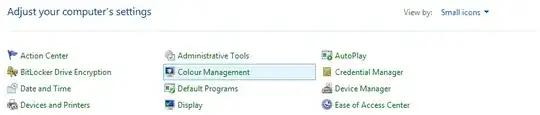
switch to the Advanced tab
click
Calibrate display: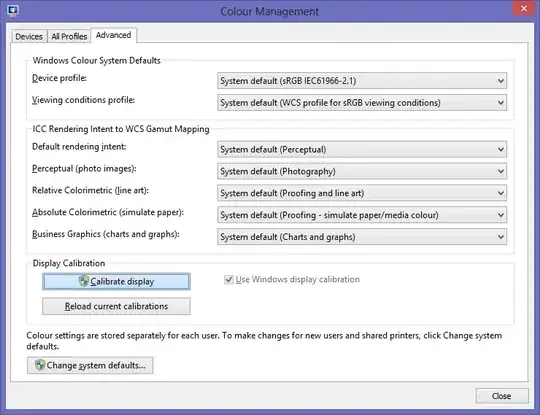


Graham Wager
- 11,647
- 3
- 30
- 50
-
-
This works for me but it resets every time I log out or switch user and does not re-apply when logging back in. – Quolonel Questions Jan 12 '15 at 11:31
2
- Right click on the desktop background
- Go to
Screen Resolution - Go to
Advanced Settings - Under the
Adaptortab go toList All Modes
Choose your favourite mode with True Color

Mikhail
- 3,852
- 4
- 32
- 51