Whenever I try to update to the latest version of Java, an installation of Java 7 Update 5 is detected and then I'm asked for the file, jre1.7.0_05-c.msi, which I don't have, so then the installation is cancelled and I'm left unable to upgrade Java.
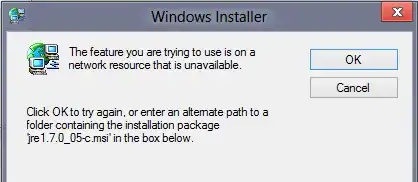
Whenever I try to update to the latest version of Java, an installation of Java 7 Update 5 is detected and then I'm asked for the file, jre1.7.0_05-c.msi, which I don't have, so then the installation is cancelled and I'm left unable to upgrade Java.

I just removed the installation entry by deleting the registry key HKEY_LOCAL_MACHINE\SOFTWARE\Classes\Installer\Products\4EA42A62D9304AC4784BF238120750FF in regedit.exe and I was then able to upgrade Java without any problems.
If possible, download jre1.7, install it, then uninstall.
Check following oracle page for old version of java:
http://www.oracle.com/technetwork/java/javase/downloads/java-archive-downloads-javase7-521261.html
If you want to get the msi file, you can install it on another computer or get it from another computer that already has it. The file location is at
c:Users/<Username>/AppData/LocalLow/Sun/Java/jre1.7
Copy it over and give it a try.

I have solved this by using windows troubleshooter , refer below link to downlad
https://support.microsoft.com/en-us/help/17588/fix-problems-that-block-programs-from-being-installed-or-removed Click download-> in problem install /uninstall troubleshooter window select product to uninstall and its done.

http://www.ihelpforum.com/index.php?guides/problem-uninstalling-java-java-not-working.112/
Use the above guide it helped med to remove java.

Mark is right; in order to be able to reinstall or upgrade java, without the current install MSI file, remove the corresponding entry from the registry ! just search by yourself, or use a reg file like this:
Windows Registry Editor Version 5.00
; 1.7.5
[-HKEY_LOCAL_MACHINE\SOFTWARE\Classes\Installer\Products\4EA42A62D9304AC4784BF238120750FF]
; 1.7.25
[-HKEY_LOCAL_MACHINE\SOFTWARE\Classes\Installer\Products\4EA42A62D9304AC4784BF238120752FF]
play this file and reboot, java is able to install at new ! it would be good to have a reg file containing all of the possibilities for every java version ^^
if it's not sufficient, M$ provides a tool for corrupted installs : http://support.microsoft.com/mats/Program_Install_and_Uninstall
