3

I just purchased a Lenovo A720 and they have a more expensive version than what I purchased that has a SSD. I figured to buy the SSD separately and save myself a little money and install it myself.

I've taken off the base cover but there doesn't seem to be a place to put the SSD. Here are some pictures - any suggestions?

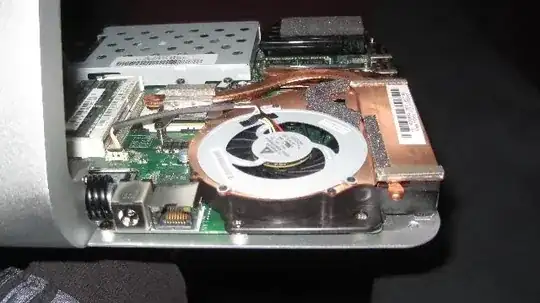
Left side as seen from the rear of the computer Right side as seen from the rear of the computer the middle of the motherboard

There are places on the web where people have said they've done the installation but not how or with pictures.

Edit: On Lenovo forums, someone had done it but doesn't say how - I've replied asking how.

Added two more pictures per request:
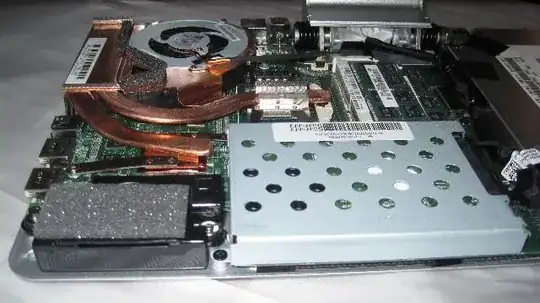
enter image description here enter image description here

fixer1234
  • 27,064
  • 61
  • 75
  • 116
Chuck Savage
  • 189
  • 1
  • 7
  • Please update your post to say you mean **mSata SSD**, not just **SSD** - otherwise you will get a significant number of repetitions of my original comment! Pictures from a higher view would be helpful too. – nerdwaller Nov 16 '12 at 21:09
  • mSATA drives connect to the miniPCIe connector – ernie Nov 16 '12 at 21:28
  • 2
    Appears to be the bottom image of all of them. The small black header that says "SSD" on the mobo should do it. – nerdwaller Nov 16 '12 at 21:28

2 Answers2

2

I obviously bought the wrong size SSD. I didn't know there were smaller (mSATA) versions.

The mSATA goes right next to the HDD and below the DVD drive to the left of the right speaker.

Chuck Savage
  • 189
  • 1
  • 7
0

Use the Lenovo manual to compare with this, the msata SSD area on MB is correct. Just do a google search for Lenovo a720 manuals.

Ron
  • 1