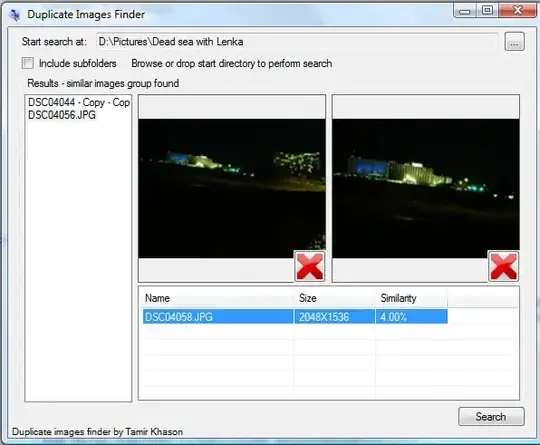
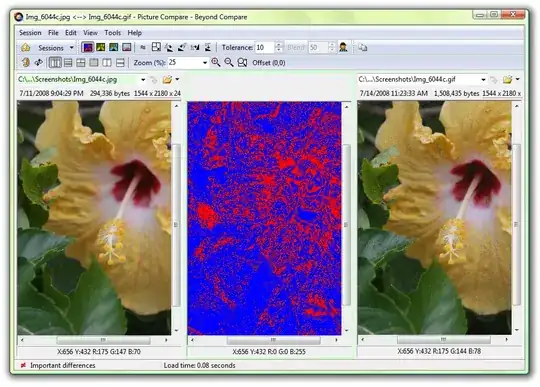
What are good tools for windows for finding similar images (size and name varies) in a directory, and displaying them side by side, so I can choose which ones I wish to keep (deleting the other one) ?
Asked
Active
Viewed 1,133 times
0


-
Related: http://superuser.com/questions/30088/good-tool-for-finding-photo-duplicates-based-on-image-data – hyperslug Oct 04 '09 at 18:23
3 Answers
2
This application can search through your images collection and find duplicates not only by file name or size, but also by visual similarity.


0


0
You can use imagemagick to create a clickable image directory containing an arbitrary collection of images:
convert 'vid:photos/random/*_orig.*' vid_index.html
See this page for an example output. You could then open them side by side in firefox or an image editor.

DaveParillo
- 14,505
- 1
- 39
- 46
-
How does that help me ? If I wanted to compare them manually, I could've opened them in thumbnail mode in firefox, side by side ... or have I misunderstood you in some way ? – Rook Oct 04 '09 at 19:16
-
well, it depends on how many images you have & how deep your directory tree is. the nice thing about the vid format is that you could recursively descend a hierarchy & make a flat index. Each image could have a caption with the iamge name, size, type, comment, whatever. Gives you a venu to make your choice & delete. If you want to do more complex comparisons (finding the difference between 2 images) you can do that too, with a different imagemagick command. – DaveParillo Oct 04 '09 at 19:25
-
If you have few images to dealwith, frankly, I liked @harrymc's answer. – DaveParillo Oct 04 '09 at 19:25