This is such an amateur question I'm embarrassed I even have to ask.
In Eclipse, sometimes I can't edit a file. I can open it, but it behaves as it if it's a read-only file—typing has no effect. It only happens sometimes though, and that's what's driving me crazy.
The only perspectives I use are Java and Perforce, and normally I check out a file via Perforce, like so:
Once checked out, it looks like this:
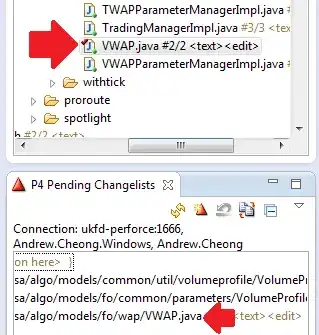
But I can't edit this file. Meanwhile, you see the file directly underneath, "VWAPParameterManagerImpl.java"? I can edit that one just fine, checking it out using the same steps. Furthermore I was able to edit "VWAP.java" just yesterday@ I have also witnessed this happening with non-java files. In Windows Explorer, I checked the file's attributes and verifed it wasn't read-only (if that means anything; I didn't know what else to check).
So, why can't I edit files in Eclipse sometimes, and what can I do make such files writable?
Obviously I can open the file up in gvim or another program, but I'd like to edit within Eclipse. I'm primarily a C++ developer and accustomed to a UNIX environment, so this Java/Windows thing is really tripping me up. Thanks in advance to anyone who might be able to advise...