Is there a debug.exe equivalent for Windows7 where I can write machine code and see what results they have after execution?
Asked
Active
Viewed 4.8k times
5

Eduard Florinescu
- 2,946
- 7
- 34
- 45
-
http://msdn.microsoft.com/en-us/windows/hardware/gg463009.aspx maybe that is what you are looking for. – avirk Nov 26 '12 at 10:36
-
I don't needed for debugging I'd like to write code machine for educational purposes much like the now defunct debug.exe. – Eduard Florinescu Nov 26 '12 at 11:01
-
Can you tell use the version of Windows 7? – Jet May 18 '14 at 20:59
3 Answers
5
Well, if you are looking only for Windows 7 then you can use WinDBG debugger which is available for both 32-bit and 64-bit Windows. You have to learn it and just search on Google for WinDBG tutorial/commands and you will get them.
You can also use OllyDbg but I'm not sure it will work on Windows 7 or not, as they have not mention it on their main page and they have just reported that it works like a charm on XP.
You can also take a look on PEBrowse Professional Interactive. Which has two versions
PEBrowseDbg64 Interactive(v3.2) is a 64-bit executable and requires the .NET framework. It will debug Win32/Win64 executables, managed (.NET) and/or native.
PEBrowse Professional Interactive (v9.3.3) is a debugger for Microsoft Windows 2000, Windows XP, Windows 2003, Windows Vista32, and Windows 7.
A very good way if you really miss it set up a virtual machine and use XP Mode in Windows 7 and you can use debug.exe in that way easily. As this question has end with the same solution of VM.


-
is it not possible to run other OS as a VM since I remember there was a debug.exe also in MS-DOS? – Eduard Florinescu Nov 26 '12 at 16:52
-
Yes you can set it up for MS-Dos as well, its VM and you can configure it with your desired OS. :) – avirk Nov 26 '12 at 16:55
-
@EduardFlorinescu i understand that technically Booting into Win9X is DOS so you might get debug to run from there too. – barlop May 18 '14 at 20:42
-
3
I've heard that it's in the 32 bit version of win7 but not the 64 but I can't confirm as I use 64. Are you trying to write assembly or machine code? I'm not sure what debug does, whether it's machine code or assembly. Try out WinAsm if it's assembly you're trying to learn/use. It's a free IDE I've used recently.
Added by Barlop
What you heard is right. The following is from Win 7 32bit, debug is available. Debug is not available in Win 7 64bit. Below is a screenshot from Win 7 32bit. (version of win7 tested on is win7 ultimate)
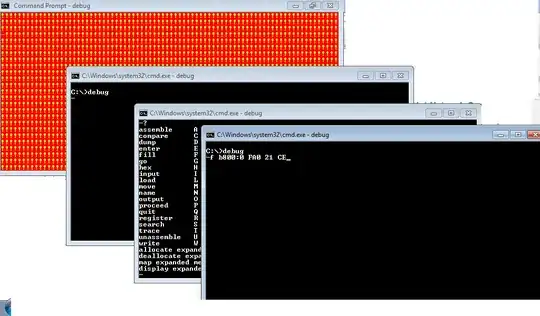


-
2This answer does not seem to have had the required research done before answering since the user only believes this to be the case. – Ramhound Nov 26 '12 at 10:34
-
It's never been on any 32 or 64 bit version I've ever had =P so put that in your pipe and smoke it. – Codezilla Nov 26 '12 at 10:42
-
Which is my point. This functionality doesn't exist on Windows. If you link to where you "heard it" I will remove the downvote. – Ramhound Nov 26 '12 at 10:56
-
@Ramhound What are you talking about saying the functionality doesn't exist on Windows. It exists in XP, it exists in Win 7 32bit. How can you say it doesn't exist in Windows. No doubt it was in Win98 too. You say he hasn't done any research. You should. And he was absolutely right. – barlop May 18 '14 at 20:48
-
1@Ramhound Right now I'm writing this from computer which runs Windows 7 Ultimate 32 bit, and unfortunately I have `debug.exe` ;) But I've installed a lot of tools such as Visual Studio 2013, WDK and so on. I'm not sure, maybe it came with that tools? – Jet May 18 '14 at 20:56
-
@Jet No I recall seeing it before installing stuff. I have VS 2013 too but saw it before then. – barlop May 18 '14 at 21:34
-
It is installed and works in 32-bit Windows 7 Pro and in 7 embedded. It is included in Windows 10 32-bit, but it has some quirks (for instance the BIOS does not seem to be mapped to f000:0). – trindflo Jul 31 '19 at 19:45
2
The public domain CDBA is pretty similar to CDB/NTSD, runs on Win64 systems; its source code (in assembler) is freely available.
It can be found at http://www.japheth.de/debxxf/CDBA.html (description) and http://www.japheth.de/debxxf/CDBA.zip (source + binary)

Federico
- 21
- 1