47

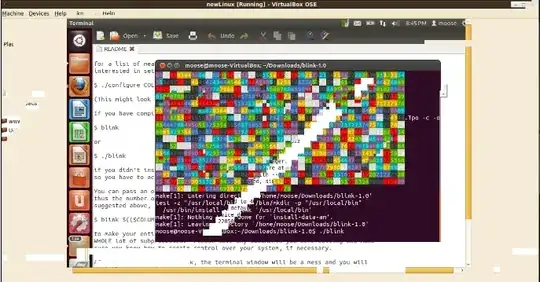
I have a video that shows the following
enter image description here

and I would like to crop it to this:

enter image description here

How can I do it?

crazypotato
  • 680
  • 4
  • 11
Martin Thoma
  • 3,384
  • 9
  • 31
  • 65
  • What have you tried yet and where did you get stuck? I'm sure there are dozens of tools that allow cropping video, so it might help to ask a more specific question, else we get a list of software that crops video – which is considered *not constructive* – slhck Nov 26 '12 at 21:11
  • I tried to find an application that supports this. I only found `ffmpeg`, but `ffmpeg -croptop 90 -i original.ogv "output.ogv"` gave me `Vertical crop dimensions are outside the range of the original image`. I did not find any graphical program for this task. – Martin Thoma Nov 26 '12 at 21:14
  • I would be happy if you could name me *one* program, that does allow me to crop by place, not by time. – Martin Thoma Nov 26 '12 at 21:15
  • Adobe Premiere, [`ffmpeg` crop filter](http://ffmpeg.org/ffmpeg.html#crop), [Handbrake](http://handbrake.fr/), QuickTime Pro, iMovie, [VirtualDub](http://www.virtualdub.org/), [VidCrop](http://www.geovid.com/vidcrop/) … – slhck Nov 26 '12 at 21:44
  • 1
    The `ffmpeg` syntax with `croptop` is quite old and won't be supported in any somewhat recent versions. You'll need to use the `-filter:v` command, see FFmpeg documentation. – slhck Nov 26 '12 at 21:48
  • People who come to this question might look for software to cut a video (so only the first 10 seconds or something similar). See [What to use to quickly cut Audio/Video](http://askubuntu.com/q/56022/10425) for that. – Martin Thoma Nov 01 '16 at 15:20

3 Answers3

71

Cropping with FFmpeg

With FFmpeg, cropping works as follows, using the crop filter:

ffmpeg -i in.mp4 -filter:v "crop=out_w:out_h:x:y" out.mp4

Where the options are as follows:

  • out_w is the width of the output rectangle
  • out_h is the height of the output rectangle
  • x and y specify the top left corner of the output rectangle

So, for example, to crop a 640×480 window, starting from position (100, 100), you'd do:

ffmpeg -i in.mp4 -filter:v "crop=640:480:100:100" out.mp4

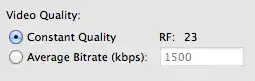
Be aware that FFmpeg will re-encode the video using x264, when the MP4 container is selected. With no additional options, this defaults to a constant rate factor (CRF) set to 23. To increase the quality—which could be necessary for screen recordings with sharp edges and text—use a lower value, maybe go down to 18:

ffmpeg -i in.mp4 -filter:v "crop=640:480:100:100" -crf 18 out.mp4

Cropping with Handbrake

Handbrake is a free and open source cross-platform tool with a GUI. Load the input file, then use the Picture Settings to specify the crop:
You can use the Preview Window to visually adjust the crop.

Here, you can also adjust the output quality with the Constant Quality slider:
slhck
  • 223,558
  • 70
  • 607
  • 592
3

Did you use Ubuntu's default recordMyDesktop tool? If so, click "Select Window" and then draw a rectangle on the thumbnail it shows of your current desktop. This area will be recorded. This is not "cropping a video" but "cropping a scene" but I think it should solve your problem at hand...

5gon12eder
  • 131
  • 1
  • As I have started the program inside of VirtualBox and I want to record it from the outside, I can't select the window. So this answer doesn't help (btw.: yes, I used recordmydesktop, but without a GUI which makes choosing a window quite difficult) – Martin Thoma Nov 27 '12 at 07:16
0

You can try a program called 'Footage' by Khaleel Al-Adhami. If that link doesn't work, Try this link as well It can crop, trim, flip and rotate.

Jeff Luyet
  • 269
  • 1
  • 6