I know, that there's an option to allow all users to open multiple sessions to one terminal server. But is there also a way to allow it only for some specific users through Group Policies?
Asked
Active
Viewed 1.4k times


1 Answers
2
Yes, you can allow multiple sessions only to specific users using GPO in conjunction with Security Groups filtering.
You can create new or edit existing GPO to limit number of sessions per user.
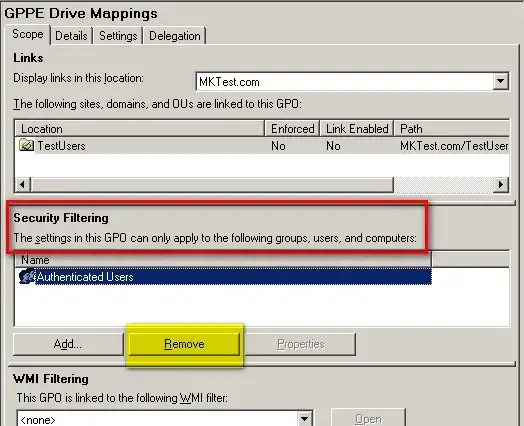
I.e. Enable option specified below in Group Policy Management Console and in Security Filtering section of the Group Policy Management console specify users/groups who this limitation applies to (exclude Everyone) and then ONLY they will be limited to one session.
Computer Configuration\Administrative Templates\Windows Components\Remote Desktop Services\Remote Desktop Session Host\Connections\Restrict Remote Desktop users to a single Remote Desktop Services session
Just remove Authenticated Users and add users\groups who should be limited to one session.

Volodymyr Molodets
- 1,616
- 1
- 13
- 18
-
Emphasis on GROUPS! If you remove _Authenticated Users_ & add a user security group & expect this to work you will get this `The following GPOs were not applied because they were filtered out: SoAndSo : Denied (Security)` It's because _Authenticated Users_ includes all domain-joined Computers. So you will either have to include the Computers you need (which I had trouble with) or a security GROUP including those Computers https://technet.microsoft.com/en-us/library/cc759506%28v=ws.10%29.aspx – gregg Apr 06 '15 at 14:24