7

I cannot add an app to the list to manually set it to high performance (Radeon instead of Intel HD). When I browse for an exe, nothing happens, the list is still empty. So, maybe I can edit some .cfg or .ini?

UPDATE

This is not my machine, but an example of what I'm looking to do: the list with iexplore.exe is what I meant. When I click 'Browse' and choose any exe (Portal2.exe, for instance) nothing happens. The list is empty, so I cannot set mode for Portal2.exe.
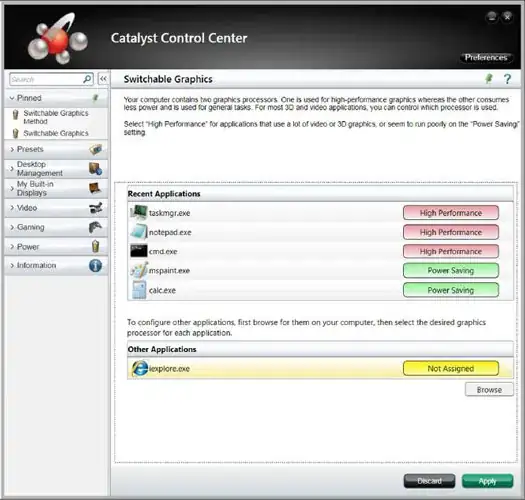
enter image description here

MaQleod
  • 13,149
  • 4
  • 40
  • 61
noober
  • 233
  • 3
  • 13
  • Sometimes the lists don't appear (not necessarily with Catalyst but generally) due to permission issues! Do you have full permission of the machine/software and OS etc? – Dave Dec 14 '12 at 12:32
  • Yep, I'm admin and UAC is turned off. What more permissions should I have? – noober Dec 15 '12 at 06:12
  • Can you please explain what you mean by app list in the Catalyst please? This may help – Dave Dec 17 '12 at 08:35
  • Please see my update. I've attached a screenshot. – noober Dec 17 '12 at 10:10
  • +1 for a better question. If you don't have an answer within 8 hours, I will check on my home PC. – Dave Dec 17 '12 at 10:10
  • Right, I'm trying to help,but I can't find the menu for switchable graphics any where – Dave Dec 17 '12 at 20:51
  • Did you installed the latest drivers? – Hashirama Senju Jan 19 '15 at 02:36
  • @HashiramaSenju Oh, that old story... Lol, Acer messed up the drivers. On their own site. 2 files were swapped. And no warnings or errors that the driver is wrong for this device. As we programmers say, there are no perfect hardware solutions a programmer can't spoil with ugly firmware, drivers or bundled applications. – noober Jan 19 '15 at 09:00
  • @noober Just checking lol =] – Hashirama Senju Jan 19 '15 at 11:52

1 Answers1

1

I've been looking around in the appdata and I found this :

C:\Users\user_name\AppData\Local\ATI\ACE\APL\GpuAffinities.xml

This is how the xml is built up :

<?xml version="1.0" encoding="utf-8"?>
<customisations Content="User" Format="1">
  <applications>
    <application Title="Google Chrome" File="chrome.exe">
      <use Area="PXDynamic">HighPerfGPUAffinity</use>
    </application>
    <application Title="Microsoft® Visual Studio® 2013" File="wdexpress.exe">
      <use Area="PXDynamic">HighPerfGPUAffinity</use>
    </application>
    <application File="iw4m.exe">
      <use Area="PXDynamic">HighPerfGPUAffinity</use>
    </application>
    <application Title="Skype" File="skype.exe">
      <use Area="PXDynamic">HighPerfGPUAffinity</use>
    </application>
  </applications>
</customisations>

I didn't test it but I guess you can simply add your programs there!

Greetings