3

Looked up the codes here http://unicodelookup.com/#hyphen/1 and I'm told that the unicode character is (in decimal) is 8208. So when I enter ALT+8208 on the numpad in Wordpad, I get this symbol a box with a question mark.
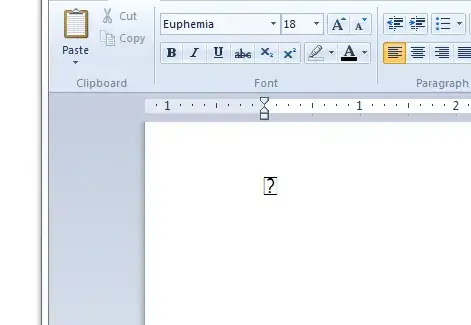
But then when I copy and paste that glyph over to SO here, it pastes as the hyphen. What I really want is the keyboard combo to insert a hyphen wherever I am typing.

Interestingly, if I type ALT+8208 here I get ►. This is extremely frustrating.

Mikhail V
  • 973
  • 5
  • 13
  • Do be nice. People are only trying to help. – random Dec 27 '12 at 05:27
  • 1
    The reason why you get ► here is that generally in Windows, Alt n where n is a number that does not being with 0 produces character n modulo 256 in a native 8-bit encoding, in this case apparently CP 437. The point is that this method should not be expected to yield characters outside code range 0...255. If you try Alt 8208, it means the same as Alt 16 (because 8208 = 16 mod 256). – Jukka K. Korpela Dec 27 '12 at 13:33

4 Answers4

3

Those are probably two completely unrelated issues.

  1. It sounds like the problem in Word is your font. Most (all?) fonts do not support all Unicode characters.

    The fact that copying and pasting results in the right character shows that Word "understood" the key combination, but cannot display the character as it should. Try using another font.

  2. The problem in the browser is bad Unicode support.

    Try setting the registry key HKEY_CURRENT_USER\Control Panel\Input Method\EnableHexNumpad to 1 and using the hexadecimal keyboard combination instead, i.e., Alt + (+, 2, 0, 1, 0). Note that you have to press + on the numpad as well.

Dennis
  • 48,917
  • 12
  • 130
  • 149
  • 2
    It’s not a font issue; Word automatically changes font when a character is not available in the current font. The autocorrect feature does not convent a “minus sign” (hyphen-minus) to a hyphen (and there is no “long hyphen”) but to EN DASH U+2013. – Jukka K. Korpela Dec 27 '12 at 06:39
  • @Jukka is correct. The only place where it'd make sense to correct to a hyphen is when hy-phe-nating words, but I'm not sure it uses a real hyphen here. Probably a hyphen-minus as well. Word usually only corrects hyphen-minuses to en-dashes when used for a parenthetical statement – like here – within a sentence. – slhck Dec 27 '12 at 06:56
  • @slhck, the hyphens generated by automatic hyphenation in word are displayed with the glyph of HYPHEN-MINUS, not HYPHEN. (Tested this using Lucida Sans Unicode as the font; in it, these characters are clearly different, HYPHEN-MINUS being much longer.) – Jukka K. Korpela Dec 27 '12 at 07:50
  • @JukkaK.Korpela: You're right, I got hyphens and dashes mixed up. But I still think there's a font issue, or the question mark wouldn't appear. – Dennis Dec 27 '12 at 12:14
  • @Dennis, you are right: in WordPad it may be a font issue (I was thinking of MS Word). For some odd reason, WordPad seems to render special characters wrong in some situations. The best chance to get them right is to select *first*, before entering any special characters, a font that contains them, e.g. Cambria or Palatino Linotype or Calibri. – Jukka K. Korpela Dec 27 '12 at 13:46
3

In WordPad and in MS Word, you can type U+2010 and then Alt X. This replaces U+2010 by the corresponding Unicode character, HYPHEN. The part U+ can be omitted if the immediately preceding character is not a hexadecimal digit (0–9, A–F) or the letter X.

In other software, it’s more complicated; see the Fileformat.info page How to enter Unicode characters in Microsoft Windows.

Beware that only a limited set of fonts contains HYPHEN, and when a program is forced to change font, HYPHEN from a different font may be unsuitable for use with your basic font. So if you wish to use HYPHEN, select a copy text font that contains it.

Jukka K. Korpela
  • 5,035
  • 2
  • 20
  • 33
0

The problem is that the font Euphemia does not have this character, hyphen U+2010 (Dec 8208).
On Windows 10 there are more fonts that already include it, e.g. Times New Roman and Sitka.

For the reference, here is a list of popular Windows 7 fonts which do not include it:

  • Arial
  • Book Antiqua
  • Bookman Old Style
  • Century
  • Comic Sans
  • Courier New
  • Georgia
  • Lucida Console
  • Times New Roman [ Fixed in Windows 10 ]
  • Verdana


The list of some fonts which do include it:

  • Arial Unicode MS
  • Calibri
  • Cambria
  • Consolas
  • Constantia
  • DejaVu Sans
  • DejaVu Serif
  • Hack
  • Lucida Sans Unicode
  • Microsof Sans Serif
  • Palatino Linotype
  • Segoe UI
  • Tahoma
  • Trebuchet MS
Mikhail V
  • 973
  • 5
  • 13
-1

Are you just looking to enter hyphens in word processors? If so, the key next to the 0 is a hyphen. Here's a site I found that would help explain how to insert a hyphen: Hyphens in Win7

Christopher Chipps
  • 750
  • 3
  • 15
  • 32
  • 2
    The question refers to a page that makes the intent clear: to use the Unicode character HYPHEN U+2010, not the legacy character HYPHEN-MINUS U++002D (“Ascii hyphen”). – Jukka K. Korpela Dec 27 '12 at 06:30