I'm using Synaptics PS/2 Port TouchPad. I want to be able to switch between open windows (like Alt+Tab) by swiping three fingers left and right. I've been searching the deepest depths of the internet trying to make this work, but with no results. Anyone know how to do this? I'm using an Acer Aspire laptop with Windows 8.
Asked
Active
Viewed 1.5k times
9


-
Is it a multi touch touchpad? If so, can it handle 3 way multi touch? If it is more than 2 years old it is likely not got a multi touch touchpad. Can you pinch to zoom at all? – Sam Dec 31 '12 at 04:32
-
@sam Yes it's multi touch. I can even use 4 finger swipe to show desktop, but nothing is registered on 3 finger gestures – hakon_dale Dec 31 '12 at 04:52
-
Oh okay. That would indicate to me that it is a Windows problem then. I haven't mucked around with gestures much. – Sam Dec 31 '12 at 04:56
-
Can you specify and preferably provide screenshots of the 3-finger gesture settings you've set under Synaptics options? – Karan Dec 31 '12 at 22:48
-
@karan http://i.imgur.com/xr58W.png. Thanks for the reply. let me know if you need any more information on the files (like the binary codes). All the folders with the name: "3finger gestures" or "4F horizontal scrolling", has the excact same information in them. – hakon_dale Jan 01 '13 at 03:25
-
Hmm, what about via the Synaptics UI (Control Panel applet)? Is there an option for 3-finger gestures there or did you just manually add the entries to the registry? – Karan Jan 01 '13 at 15:46
-
@karan There are no options for 3 finger gestures, so I have to do it manually – hakon_dale Jan 01 '13 at 19:10
-
Ok, so what makes you believe the touchpad explicitly supports 3-finger gestures? Isn't it possible that it's capable only of reliable 2 and 4-finger gesture recognition? If it was capable of 3-finger gestures, I fail to see why they would hide that option. – Karan Jan 01 '13 at 19:14
-
3-finger click works as clicking the "scrolling wheel" on a mouse. There are no options for it, it just is that way (I see I wrote nothing was registered on 3-finger gestures, but I meant 3-finger SWIPE gestures) – hakon_dale Jan 01 '13 at 19:35
-
Do you have [the latest driver](http://www.synaptics.com/resources/drivers) ? – harrymc May 08 '13 at 06:56
4 Answers
0
Your laptop's touchpad almost certainly does not support the gesture that you want. To see exactly what is supported, you'll need to review the Touchpad section of the Windows Settings app. If it's not listed there, it's not supported. Of course, if your drivers are out of date, you can update them to see if the manufacturer has added any new capabilities to its touchpad drivers.
I have an Acer Aspire that's about a year old, a Lenovo Yoga about the same age, and an old Lenovo T60p. In addition, I've worked on my mother's Acer Aspire that is also about a year old. All of these laptops are running the same OS (Windows 10), but they all have different levels of support for swiping gestures. Thus I've realized that touchpad gesture support is very much going to depend on the laptop hardware and its drivers.
Not surprisingly, the Lenovo Yoga has the highest level of support for touchpad gestures. Both Aspires have comparatively little support. The T60p is also fairly limited, primarily because it is so old--the driver software for it really shows its age.

loopernow
- 124
- 1
- 9
0
I think you have a conflict of gesture-handling between Synaptics and Windows 8. Up-down three finger swipe is used by Windows 8 to manage the desktop.
If you turned off Windows 8 gesture-handling you might have a chance of getting Synaptics to work. Unfortunately, I don't have Windows 8 or a touch-screen to check this out.
I found this image for how this is done in Mouse Properties :
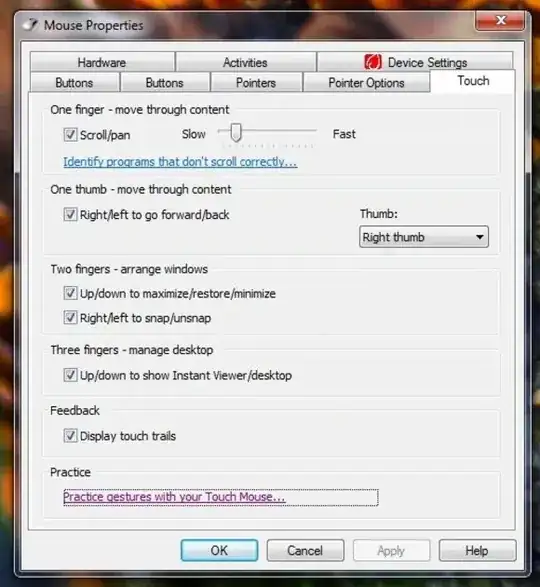

harrymc
- 455,459
- 31
- 526
- 924
0
Modifying the following registry value works on my laptop with synaptic touchpad, hope it helps, remember to make backup first
Windows Registry Editor Version 5.00

;enable 3 finger flick
[HKEY_CURRENT_USER\Software\Synaptics\SynTPEnh\ZoneConfig\TouchPadPS2\Plugin Zone]
"UserZoneFlags"=dword:00000431

;actionid3 = right flick
;actionid7 = left flick
;dword 1c = macro key
[HKEY_CURRENT_USER\Software\Synaptics\SynTP\TouchPadPS2\3FingerGestures]
"PlugInID3"="SynTP"
"ActionID3"=dword:0000001c
"PlugInID7"="SynTP"
"ActionID7"=dword:0000001c

;macro key
[HKEY_CURRENT_USER\Software\Synaptics\SynTPEnh\PlugInConfig\TouchPadPS2\3FingerGestures]
;left flick macro = ctrl + alt + shift + tab
"ConfigID7KeyMacroBin"=hex:01,00,00,00,00,00,00,00,00,00,00,00,63,00,74,00,\
72,00,6c,00,20,00,61,00,6c,00,74,00,20,00,74,00,00,00,00,00,00,00,00,00,00,\
00,00,00,00,00,00,00,00,00,00,00,00,00,00,00,00,00,00,00,00,00,00,00,00,00,\
00,00,00,00,00,00,00,00,00,00,00,00,00,00,00,00,00,00,00,00,00,00,00,00,00,\
00,00,00,00,00,00,00,00,00,00,00,00,00,00,00,00,00,00,00,00,00,00,00,00,00,\
00,00,00,00,00,00,00,00,00,00,00,00,00,00,00,00,00,00,00,00,00,00,00,00,02,\
00,00,00,09,04,09,04,00,00,00,00,09,04,00,00,00,00,00,00,01,00,00,00,00,00,\
00,00,11,00,00,00,02,00,00,00,00,00,00,00,00,00,00,00,01,00,1d,00,00,00,00,\
00,00,00,00,00,00,00,00,00,01,00,00,00,00,00,00,00,01,00,00,00,00,00,00,00,\
12,00,00,00,02,00,00,00,00,00,00,00,00,00,00,00,01,00,38,20,00,00,00,00,00,\
00,00,00,00,00,00,00,01,00,00,00,00,00,00,00,01,00,00,00,00,00,00,00,10,00,\
00,00,02,00,00,00,00,00,00,00,00,00,00,00,01,00,2a,20,00,00,00,00,00,00,00,\
00,00,00,00,00,01,01,00,00,00,00,00,00,01,00,00,00,00,00,00,00,09,00,00,00,\
02,00,00,00,00,00,00,00,00,00,00,00,01,00,14,20,00,00,00,00,00,00,00,00,00,\
00,00,00,01,01,00,00,00,00,00,00,01,00,00,00,00,00,00,00,09,00,00,00,00,00,\
00,00,00,00,00,00,00,00,00,00,01,00,14,e0,00,00,00,00,00,00,00,00,00,00,00,\
00,00,00,00,00,00,00,00,00,01,00,00,00,00,00,00,00,10,00,00,00,00,00,00,00,\
00,00,00,00,00,00,00,00,01,00,2a,e0,00,00,00,00,00,00,00,00,00,00,00,00,00,\
00,00,00,00,00,00,00,01,00,00,00,00,00,00,00,12,00,00,00,00,00,00,00,00,00,\
00,00,00,00,00,00,01,00,38,c0,00,00,00,00,00,00,00,00,00,00,00,00,00,00,00,\
00,00,00,00,00,01,00,00,00,00,00,00,00,11,00,00,00,00,00,00,00,00,00,00,00,\
00,00,00,00,01,00,1d,c0,00,00,00,00,00,00,00,00,00,00,00,00,00,00,00,00,00,\
00,00,00
;right flick macro = ctrl + alt + tab
"ConfigID3KeyMacroBin"=hex:01,00,00,00,00,00,00,00,00,00,00,00,63,00,74,00,\
72,00,6c,00,20,00,61,00,6c,00,74,00,20,00,74,00,00,00,00,00,00,00,00,00,00,\
00,00,00,00,00,00,00,00,00,00,00,00,00,00,00,00,00,00,00,00,00,00,00,00,00,\
00,00,00,00,00,00,00,00,00,00,00,00,00,00,00,00,00,00,00,00,00,00,00,00,00,\
00,00,00,00,00,00,00,00,00,00,00,00,00,00,00,00,00,00,00,00,00,00,00,00,00,\
00,00,00,00,00,00,00,00,00,00,00,00,00,00,00,00,00,00,00,00,00,00,00,00,02,\
00,00,00,09,04,09,04,00,00,00,00,09,04,00,00,00,00,00,00,01,00,00,00,00,00,\
00,00,11,00,00,00,02,00,00,00,00,00,00,00,00,00,00,00,01,00,1d,00,00,00,00,\
00,00,00,00,00,00,00,00,00,01,00,00,00,00,00,00,00,01,00,00,00,00,00,00,00,\
12,00,00,00,02,00,00,00,00,00,00,00,00,00,00,00,01,00,38,20,00,00,00,00,00,\
00,00,00,00,00,00,00,01,00,00,00,00,00,00,00,01,00,00,00,00,00,00,00,09,00,\
00,00,02,00,00,00,00,00,00,00,00,00,00,00,01,00,14,20,00,00,00,00,00,00,00,\
00,00,00,00,00,01,00,00,00,00,00,00,00,01,00,00,00,00,00,00,00,09,00,00,00,\
00,00,00,00,00,00,00,00,00,00,00,00,01,00,14,e0,00,00,00,00,00,00,00,00,00,\
00,00,00,00,00,00,00,00,00,00,00,01,00,00,00,00,00,00,00,12,00,00,00,00,00,\
00,00,00,00,00,00,00,00,00,00,01,00,38,c0,00,00,00,00,00,00,00,00,00,00,00,\
00,00,00,00,00,00,00,00,00,01,00,00,00,00,00,00,00,11,00,00,00,00,00,00,00,\
00,00,00,00,00,00,00,00,01,00,1d,c0,00,00,00,00,00,00,00,00,00,00,00,00,00,\
00,00,00,00,00,00,00

user3893381
- 11
- 1
-
1And this block of code is supposed to do what exactly? Please expand on it. – Ƭᴇcʜιᴇ007 Aug 18 '14 at 16:29
-
0
This is easily achieved with a program I made called MultiSwipe, its a touchpad customizing utility for synaptics multitouch touchpads for Windows xp/vista/7/8/8.1, It basically maps keyboard input to your touchpads 4 finger swipe, in any direction, so to answer your question you can install MultiSwipe and map alt+tab or control+alt+tab to your left and right swipe in the Key Set section of the program, control+alt+tab is recommended as alt+tab would only cycle between the 2 most recent windows so for the left swipe you can write Control,LeftShift,LeftAlt,Tab and for the right swipe Control,LeftAlt,Tab the shift in the leftswipe makes it go the other way, after setting the keys you would swipe left or right and the window switcher would open allowing you to move left or right in the open windows with every swipe, you do need administrative privileges to install as some features like controlling the execution of alt-tab require them. Although only 4 finger swipe is supported, not 3, but its the same if your touchpad is a multitouch touchpad it will serve the same functionality except that you will use 4 fingers, you can download it here www.multiswipe.com
This will let you change between windows only using your touchpad sort off like Apple MacBook no need to reach for your keyboard, there are other solutions but they all seem so invasive like modifying the registry and don't really work very reliably because they will become overwritten when you update your drivers, so you can check out MultiSwipe if you want.

UserName
- 75
- 4