Can I make a program on my Mac that when activated will automatically press two keys in sequence repeatedly?
Strange request, but for my Mac to work the brightness down and brightness up keys must be constantly toggled.
Can I make a program on my Mac that when activated will automatically press two keys in sequence repeatedly?
Strange request, but for my Mac to work the brightness down and brightness up keys must be constantly toggled.
AppleScripts can't simulate pressing the media keys. Otherwise something like this might work:
repeat
    tell application "System Events"
        delay 1
        key code 122 -- F1
        delay 1
        key code 120 -- F2
    end tell
end repeat
I also tried changing other key combinations to the brightness keys with KeyRemap4MacBook, but it doesn't affect the key code or keystroke commands.
Keyboard Maestro can simulate pressing the media keys (even though they are shown as question marks):
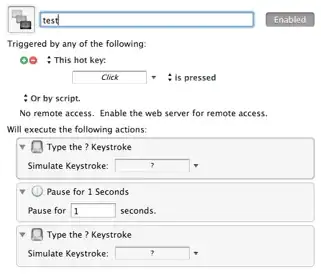
You can run the action every minute by adding this to crontab:
* * * * * osascript -e 'tell app "Keyboard Maestro Engine" to do script "test"'
Another option might be to run brightness.c with cron or launchd.
Does your brighness change unexpectedly? Then Go in "System Preferences", and then the "Display" section, and untick the "Automatically adjust brightness as ambient light changes" option.

This is the cleanest/easiest way I can think of:
Go to: http://mattdanger.net/2008/12/adjust-mac-os-x-display-brightness-from-the-terminal/, scroll to the bottom, and download the precompiled binary. Unarchive and place it in your Applications folder (/Applications)
After you have that placed, open Applescript editor and type:
repeat
do shell script "/Applications/brightness 0.9"
delay 0.5
do shell script "/Applications/brightness 1"
delay 0.5
end repeat
Export that wherever you want as an app.
When you launch it, it should quickly fluctuate your brightness.
It's a lot less glitchy if you go to System Preferences>Displays>Display and uncheck "Automatically adjust brightness."


