23

The Windows CMD utility has a number of internal commands, such as mklink. How can they be used from the msys shell ?

From CMD's documentation, the /c switch can be used to execute a command and exit; but this doesn't seem to work.

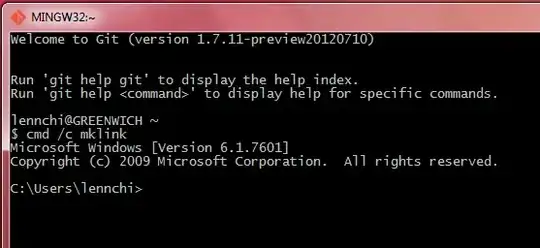
  • If I do cmd /c mklink the mklink command is not executed and the CMD shell is not exited.

Before pressing Enter:
enter image description here

After:

enter image description here

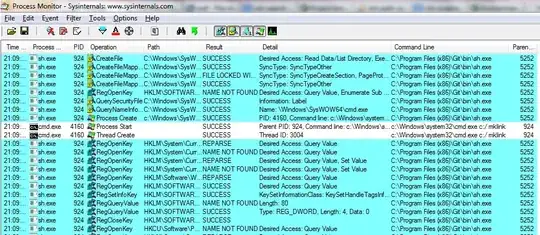
Process Monitor screenshot:

enter image description here

  • Trying to run the command as a background process: cmd /c mklink & apparently works - the mklink command is executed, but the CMD shell is not terminated. Every time Enter is pressed, CMD will become the active shell.
Mihai Rotaru
  • 2,799
  • 5
  • 26
  • 25
  • `cmd /c mklink` works for me with my C shell, with Cygwin `bash` and with `cmd.exe`. But I did have to be running elevated or else I got complaints, "You do not have sufficient privilege to perform this operation." I haven't tried `msys` because I don't have it installed but I'm skeptical that's the problem. I'm suspicious there's something else going on. A transcript or a screen shot of what you did and what happened might be helpful. – Nicole Hamilton Jan 01 '13 at 18:53
  • @NicoleHamilton, screenshots added. For `mklink` to work, the shell does indeed need to be run as administrator; but my problem is that I can't run any of the internal commands without the `cmd` shell either taking over or running in the background. This issue is also present for simpler commands which do not require admin, such as `dir`. – Mihai Rotaru Jan 01 '13 at 19:53
  • Do you have an alias, procedure definition or script that may be intercepting `cmd`? – Nicole Hamilton Jan 01 '13 at 20:04
  • 1
    @NicoleHamilton, nope; I took @Maxiums' advice and ran Process Monitor, and as can be seen in the screenshot I attached, the issue is that `msys` converts `/c` to `c:\ `. The answer is to escape it, and run the command as `cmd //c mklink`. – Mihai Rotaru Jan 01 '13 at 21:29

4 Answers4

16
  1. Search your %PATH% for cmd.cmd or cmd.bat. They may interfere with your cmd

  2. Run Process Monitor and run your cmd /c mklink. Examine ProcMon log for really executed commands.

Maximus
  • 20,637
  • 16
  • 91
  • 116
  • 29
    Process Monitor helped track down the issue. It is that `msys` will convert `/c` to `c:\ `; it needs to be escaped: `cmd //c mklink`. The way these conversions are done is explained [here](http://www.mingw.org/wiki/Posix_path_conversion). – Mihai Rotaru Jan 01 '13 at 21:32
  • 3
    @MihaiRotaru this comment should be an answer – laktak Mar 15 '16 at 14:27
3

win7/cygwin/bash had same problem, solution is to launch cmd twice, and convert slashes to backslashes as needed by cmd (for example): REPO_DIR=${REPO_DIR////\\} # Example, Turn c:/cvs into c:\cvs for cmd
cmd /C "cmd /C mklink /D .Repo $REPO_DIR" # launch cmd /C cmd /C cmd

mosh
  • 297
  • 2
  • 8
2

Process Monitor helped track down the issue. It is that msys will convert /c to c:\ ; it needs to be escaped: cmd //c mklink. The way these conversions are done is explained here. – Mihai Rotaru Jan 1 '13 at 21:32

I could not get this to work based on Mihai's comment alone, because the path still contained forward slashes / in it, and mklink complained that /msys64 was not a valid switch.

So I wrote a batch script to get it working.

Here's how I call my batch script from MSYS:

 $ mingw_ln.bat "$destination" "$targetpath"

And, the batch script takes those two paths, and converts / to \, using the :OLD=NEW parameter expansion syntax for string replacements.1

set LINK=%1
set TARGET=%2

REM Convert POSIX paths to Windows paths
set LINK=%LINK:/=\%
set TARGET=%TARGET:/=\%

mklink /D %LINK% %TARGET%

1 This is similar to bash's ${PARAM:/OLD/NEW} syntax, for those familiar with it

jpaugh
  • 1,378
  • 10
  • 20
1

Expanding on Mihai Rotaru's comment:

Process Monitor helped track down the issue. It is that msys will convert /c to c:\ ; it needs to be escaped: cmd //c mklink. The way these conversions are done is explained here. – Mihai Rotaru Jan 1 '13 at 21:32

This /c to c:\ conversion can also be avoided for some or all arguments by using the environment variable MSYS2_ARG_CONV_EXCL.

E.g.

$ MSYS2_ARG_CONV_EXCL='*' /c/Windows/System32/cmd.exe /C "echo foo"

(Careful since '*' and "*" will mean different things.)

Citing the MSYS2 docs:

MSYS2_ARG_CONV_EXCL can either be * to mean exclude everything, or a list of one or more arguments prefixes separated by ;, like MSYS2_ARG_CONV_EXCL=--dir=;--bla=;/test [...]

poinu
  • 11
  • 3