1

Is there an program that you can type into command line or terminal with a set of parameters to run a 16 bit program? Such as: "run16bitprogram.exe 'path/to/program/test.exe'" and just output whatever the program does in the console.

If there are such programs, i would like them to be cross platform if possible.

Here is an example image of the dosbox executed from Java: enter image description here
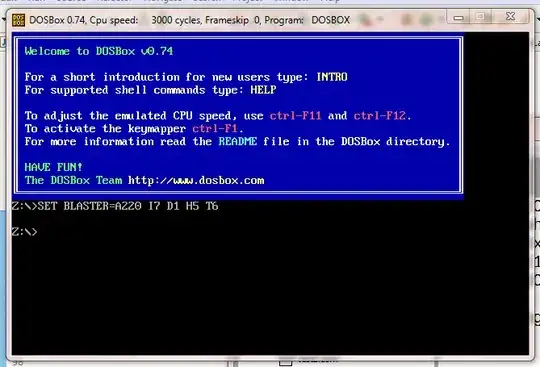
Here is the config file: enter image description here

Here is the code from java (ProcessBuilder did not even open DOSBox):

Runtime.getRuntime().exec(new String[] { "C:/Program Files (x86)/DOSBox-0.74/DOSBox", "-conf \"C:/Users/Braden Steffaniak/Documents/GitHub/Workspace/ArrowIDE/res/assembly/new.conf\"", "-noconsole" });

The -noconsole command works, but if I add any -c parameters, it does not do anything.

If I type the command in command prompt, it works as I expect it to.

  • 1
    Not possible in general, see below. However, if you told us what you don't like about DOSbox, maybe we can find a better solution for you? – us2012 Jan 08 '13 at 00:29
  • Well, nowhere on all of that can I see a reference to the exe file you want to run. How is dosbox supposed to know what you want to run? That should go in your autoexec, not just the mounting. Besides, I think there's something wrong about the way you're using the config, but I'll check... – us2012 Jan 08 '13 at 01:39
  • What I am trying to do in the pictures shown is get a simple command to run on DOSBox, not go the full mile yet. I will move on to that when I can get a simple mount command to work. –  Jan 08 '13 at 01:41
  • Updated my answer, your problem is most likely related to wrong paths or a wrong config. I have a working solution with `ProcessBuilder` for you below. – us2012 Jan 08 '13 at 02:01

2 Answers2

2

It's definitely not possible on Windows, see the following MSDN article: http://support.microsoft.com/kb/896458

Any tool that will allow you to run a 16bit prog on a 64bit Windows system has to emulate a system, which is what DOSbox does.


The following works:

public class DosBoxCaller {
    public static void main(String[] args) {
        ProcessBuilder pb = new ProcessBuilder(
                "C:\\Program Files\\DOSBox-0.74\\DOSBox.exe",
                "-conf C:\\Users\\Y\\dosbox.conf");
        pb.directory(new File("C:\\Users\\Y"));
        pb.redirectErrorStream(true);
        try {
            Process p = pb.start();
        } catch (Exception e) {
            e.printStackTrace();
        }
    }
}

If this doesn't call DOSBox for you, then you're probably getting a path wrong and simply ignoring the exception that is being thrown. Also doublecheck that your conf option is valid, and use a modified copy of the fullfledged dosbox config (to be found at your user folder\Application Data\Local\DosBox, copy it to your favorite folder, then edit autoexec).

us2012
  • 152
  • 7
  • 1
    I am fine with it emulating a system, I just do not want it to open a window to specifically run the program. –  Jan 08 '13 at 00:43
  • @BradenSteffaniak Could you elaborate on what that 16bit program does. I don't really see the problem with the command prompt window that DOSbox opens, you can always minimize that? – us2012 Jan 08 '13 at 00:53
  • The 16 bit program is in assembly language. The problem I have with DOSBox is that I am trying to run it through java's ProcessBuilder, and it will not accept and "-c" arguments which I need to navigate to the directory and run the program without having to type it in every time. –  Jan 08 '13 at 00:58
  • @BradenSteffaniak Can you not simply call DOSBox through the ProcessBuilder and let the automatic start of your program through DOSBox's `autoexec.bat` as described here: http://www.dosbox.com/wiki/AUTOEXEC ? – us2012 Jan 08 '13 at 01:01
  • For some reason even that does not work either. –  Jan 08 '13 at 01:09
  • 1
    @BradenSteffaniak *What* doesn't work when you try that? It's really hard to help you if you always hide half of the info you have... – us2012 Jan 08 '13 at 01:18
  • When I run the program, it just opens without executing any of the commands. –  Jan 08 '13 at 01:18
  • @BradenSteffaniak Update your question, show the `[autoexec]` section of your dosbox config, the code that creates the creation `ProcessBuilder` and a screenshot of what the DOSBox looks like when it's started by the the `ProcessBuilder`. – us2012 Jan 08 '13 at 01:20
2

There's an emulator which can run simple commandline DOS programs in Windows x64. It's called "MS-DOS Player for Win32-x64". The source is provided, so in theory you can implement missing functionality.

http://takeda-toshiya.my.coocan.jp/msdos/index.html

Daniel Wolf
  • 161
  • 1
  • 2
  • 10
igorsk
  • 121
  • 4