A few months ago, I acquired a Windows 7 Ultimate product key and updated from Home Premium to Ultimate. Well, now I get the "This copy of Windows is not genuine" message. I have the Home Premium product key that I was using before I upgraded to Ultimate. I would want to know how I could downgrade from Ultimate to Home Premium without having any CD and only the product key. If it helps, it's a 64-bit OS. Thanks in advance!
Asked
Active
Viewed 1.0k times

1 Answers
6
You need a disk for doing this. Google for digital river windows 7 iso and download the ISO, use a tool called ei.cfg Removal Utility to change the ISO to Home Premium.
Now run the Tool Windows 7 Downgrader (read the comments there for special steps on 64bit systems),
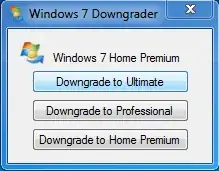
click on "Downgrade to Home Premium", insert the Windows 7 DVD and do an Inplace Upgrade/ Repair Installation:
- In the running Windows 7, mount the ISO or insert the DVD
- Run setup from the DVD and select "Upgrade"
This downgrades Win7 Ultimate to Home Premium.
NOTE: This is not officially supported by MS, but it works.

Bob
- 23
- 4

magicandre1981
- 97,301
- 30
- 179
- 245