11

I have a small VB Script that calls a system sound as an alert. In Windows XP I used sndrec32 to play that sound. But sndrec32 was not continued in Vista and Windows 7. It was light and quick and ideal for such tasks.

Q: What replaced this tool? When you click the test button in the sounds window what is it that plays it?

nixda
  • 26,823
  • 17
  • 108
  • 156
Dave
  • 111
  • 1
  • 1
  • 3

1 Answers1

10

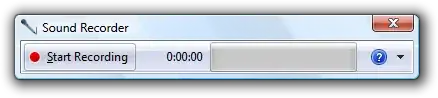
In Vista, Sound Recorder is instead called SoundRecorder.exe and has different command-line switches.

enter image description here
Source


  • The only command line option I found so far can only be used for recording.
    SoundRecorder /FILE myrec.wma /DURATION 0000:00:30

  • The old /PLAY "C:\Path\File.wav" /CLOSE switch doesn't work anymore

  • You can use wmplayer.exe %windir%\media\ding.wav instead.
    It supports several command line parameters and can be started minimized

  • You could copy the old sndrec32.exe from Windows XP over to your Windows 7 into the same place. It needs the "Run as Administrator" option checked

nixda
  • 26,823
  • 17
  • 108
  • 156
  • sndrec32.exe is also in Windows Server 2003 if you have that handy like I did. – Matthew Lock Dec 19 '14 at 03:19
  • I couldn't get it to start minimized by running from a command line. Found an answer here to create an run a VBA script: http://stackoverflow.com/questions/23313709/play-invisible-music-with-batch-file – davidfrancis Jun 11 '15 at 07:58
  • Blech, so ugly. Why do they have to change the things they got right? – einpoklum Jan 04 '17 at 19:56