0

Even after I overclocked it? Seems really odd it stays on the range of 45-48 Celsius.

before overclock
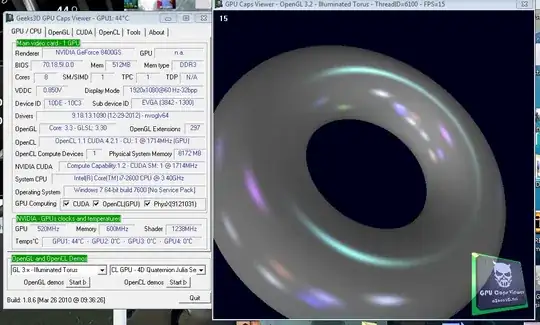
enter image description here

After overclocking enter image description here

I'm scared that the number is not correct and my card is frying.. why could this be?

Sathyajith Bhat
  • 61,504
  • 38
  • 179
  • 264
Rufio
  • 25
  • 1
  • 6
  • 2
    how did you check the temperatures? what was the load? – Sathyajith Bhat Jan 22 '13 at 13:56
  • TechPowerUp GPU-Z and EVGA Precision. Both indicate the same heat. GPU clock went from 520 to 730Mhz and memory stayed in 600Mhz. Does that mean I can keep overclocking the card? I also played half an hour of a 3D game went to 49 Celsius top. – Rufio Jan 22 '13 at 13:59
  • underclock it. The temperature should drop. In fact, using EVGA Precision implies that you are using a card that is modern enough to underclock itself in Windows, and then clock up to a more powerful setting during a game. Is that happening? If it is, then you should be seeing one (lower) temperature during normal operation, and a second temperature during load operation. What would those temps be? – Bon Gart Jan 22 '13 at 14:02
  • I am using a really old and deprecated card actually. An nvidia 8400gs. Was that a bad idea? I actually gained 15-20fps in game while over clocking it, but temperatures remained the same. Perhaps I'm confusing Celsius and fahrenheit and 49 Celsius is actually pretty high temperature for the card? – Rufio Jan 22 '13 at 14:08
  • I really doubt overclocking *that* card would have gained you 15-20 fps - if it's it's really 45-49 fps then it's fine. The card won't fry, if it goes over the thermal trip point it'll shut down – Sathyajith Bhat Jan 22 '13 at 14:16
  • It's 45-49 Celsius and I swear I've gained at least 15 fps in game. Wish I can prove it somehow. I'm playing everything on the lowest from the start btw (before and after overclocking, haven't change any video setting) – Rufio Jan 22 '13 at 14:18
  • Yeah... still not enough information though. I mean, there are a ton of 8400 GS cards out there that didn't come with a cooling fan (PNY and eVGA are just two names that made some). So, you haven't told us anything about the actual card, or what kind of cooling is on the card, whether or not you replaced the stock cooling with something better, what game, computer specs, etc. Try this. Use http://www.ozone3d.net/gpu_caps_viewer/ set to default clocks, screen capture, then overclock and get a second screen capture. There's the proof. – Bon Gart Jan 22 '13 at 14:24
  • It's an 8400gs 512MB eVGA card with a small fan came with 520Mhz gpu and 600Mhz memory. I've never overclocked it before(Maybe the person that sold it to me or the company?). I have a i7 processor 8gbs of memory and a Asus board. Playing Path of Exile with everything turned off and 800x600 since the beginning. I just noticed it drops to 34 Celsius but I was expecting it to exceed the 70 celsius mark. – Rufio Jan 22 '13 at 14:32
  • Is this good proof? overclocked http://gyazo.com/9bd35d64f69cb242336fb2201044c9d3.png not overclocked http://gyazo.com/ca9dfa02634e3e1b7c72141c3fec14ef.png – Rufio Jan 22 '13 at 14:47
  • One more think, the increase on the test isn't much, but on the game it does have a significant increase of FPS. – Rufio Jan 22 '13 at 23:03

1 Answers1

0

From the pictures you uploaded your card is operating as expected. You'll generally not see much change in temperature unless there is a serious issue such as the fan malfunctioning or the heatsink getting too dirty to properly dissipate heat.

Due to its design if there is a problem with overheating, your GPU will shut down regardless of the temperature being reported in windows.

Snesticle
  • 966
  • 1
  • 8
  • 15
  • um, that's a 200mhz OC on the GPU clock... You should definitely notice a thermal difference. – Supercereal Jan 22 '13 at 17:15
  • Yes and this is why I used the term "much change" as opposed to "no change". If you're expecting a double digit rise in degrees Celsius based exclusively on cycle frequency then perhaps one of us is ignorant of the topic at hand. It's not as if I have a masters from MIT or anything so it could certainly be me. – Snesticle Jan 22 '13 at 17:58
  • You're not guaranteed a double digit increase as every card (even reference cards of the same model) will handle an OC differently. However there will should be a noticeable thermal increase with a 200mhz OC. – Supercereal Jan 22 '13 at 19:30
  • Also "Due to its design if there is a problem with overheating, your GPU will shut down regardless of the temperature being reported in windows." is just bad advice. Hitting the thermal trigger for shutdown may save the card from being fried instantly however it will still heavily degrade the semi conductor. http://superuser.com/questions/294602/at-what-working-temperatures-will-my-gpu-not-only-survive-but-have-a-long-healt – Supercereal Jan 22 '13 at 19:34
  • Thanks for the answers guys. Really helpfull. As Kyle said I read in multiple sites that I was to expect a increase and even a high increase after overclocking the 8400gs. Hoewever I've noticed that even though the card doesn't rise higher than 49 Celsius the driver crashes when getting the card to 730Mhz+ GPU everytime. Could this be due overheating? – Rufio Jan 22 '13 at 22:50
  • @Rufio that is not overheating. For a large OC like you are doing I can almost guarantee you need to increase the voltage on the card. Again every card handles OC differently so the amount of voltage you need will vary. However from my experience I'm lucky to get 50mhz on my core clock without increasing voltage. – Supercereal Jan 23 '13 at 13:54