36

These wonderful icon overlays that give you useful information in the Windows Explorer are not showing up. a Screenshot of what I mean

It's the most annoying with Dropbox (I already read https://www.dropbox.com/help/154/en). I just tried reinstalling Dropbox - no help. I have this problem also with the Link Shell Extension so I don't think that it is a dropbox problem specifically; and something is wrong in my OS. The OS is actually a pretty fresh clean-install...

OS: Win8 Pro 64-bit.

kluka
  • 2,164
  • 6
  • 23
  • 37

2 Answers2

40

Looks like you've installed too many tools which register Overlay icons. Windows has an ugly limit of only 15 overlay icons because of old 16 Bit code that can't be changed:

The value 15 came from the corresponding limit for image lists. The Image­List_Set­Overlay­Image function supports up to 15 image list overlays per image list. (Hey, it used to be worse. The limit used to be only 3!)

Okay, but why only 15? Why not more?

The overlay image is one of the pieces of information used when drawing an image from an image list. The options are encoded in the fStyle parameter, and when the bits were divided up for various purposes, four bits were available to be used to specify the overlay image. (You get 15 overlay images instead of 16 because you lose one of the values in order to specify “no overlay.”)

Okay, but the values in the fStyle parameter use only the bottom 16 bits. What about the upper 16 bits? There’s plenty of room there.

The 16-bit limit was carried over from the 16-bit version of the common controls (which still needed to be supported in Windows 95). Of course, nowadays, nobody cares about the 16-bit version of the common controls, so why not start using the upper bits?

There’s an unsatisfying explanation: The code internally that manages the fStyle still uses a WORD in some places, so all the code that manages the fStyle would have to be revised. This occurs in multiple modules across Windows, so a synchronized change would have to be made across multiple components. This is a breaking change at the binary level because the interfaces are no longer compatible. Breaking changes are procedurally difficult to coordinate: The affected code may not be visible to the shell team because they are sitting in a far-away leaf branch that has not yet RI’d to the trunk. It might be that expanding fStyle from a WORD to a DWORD has far-reaching consequences for some component.

So Microsoft can't really fix it without breaking Explorer.

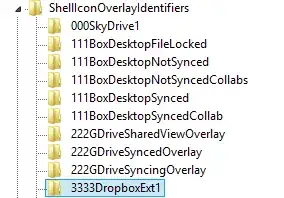
Open regedit, go to

  • HKEY_LOCAL_MACHINE\SOFTWARE\Microsoft\Windows\CurrentVersion\Explorer\ShellIconOverlayIdentifiers and
  • HKEY_LOCAL_MACHINE\SOFTWARE\WOW6432Node\Microsoft\Windows\CurrentVersion\Explorer\ShellIconOverlayIdentifiers

and count the number of items. Are you hitting the limit of 15?

If yes, then either uninstall or reconfigure applications that are shown here or remove the registry entries manually (backing them up of course).

magicandre1981
  • 97,301
  • 30
  • 179
  • 245
  • I had both installed on my Windows7 - and probably **a lot** of stuff more - the win7 was running for ~3 years... – kluka Jan 27 '13 at 02:09
  • 3
    open regedit, go to `HKEY_LOCAL_MACHINE\SOFTWARE\Microsoft\Windows\CurrentVersion\Explorer\ShellIconOverlayIdentifiers` and `HKEY_LOCAL_MACHINE\SOFTWARE\Wow6432Node\Microsoft\Windows\CurrentVersion\explorer\ShellIconOverlayIdentifiers`and count the number of items. Are you hitting the limit of 15? – magicandre1981 Jan 27 '13 at 06:56
  • 20 items.... it's gotten filled up with *Skydrive*. Arrgh! (I uninstalled another program and now it works) – kluka Jan 27 '13 at 09:04
  • Remaining question though: Would it be safe to manually remove Registry entries in that "folder" ? – kluka Jan 27 '13 at 09:08
  • this i save, but make a backup of the key first and next disable entries you don't need. I also have the issue and removed some TSVN entries. – magicandre1981 Jan 27 '13 at 19:39
  • Can't blame the user ('you've installed too many' ...) - maybe some apps are just greedy; Dropbox takes 10, OneDrive takes 5, TortoiseSvn takes 9, leaving none for anyone else! – Ed Randall Mar 15 '17 at 08:50
  • @EdRandall I don't blame anyone. windows has this ugly 15 overlay icon limit. so send feedback to MS. I annoy them for years, but if more users complain, they may fix it. – magicandre1981 Mar 15 '17 at 16:47
  • This [blog post](https://blogs.msdn.microsoft.com/oldnewthing/20091209-00/?p=15723/) by a Microsoft employee gives an explanation on why their stance might be that it's not the limit that is the problem, but the way overlays are (ab)used by third-party apps. As the post points out, they're not really suited to display properties, since only one overlay can be shown at a time. So if you use TortoiseSVN and Dropbox, and store a repository in your Dropbox folder, it already gets confusing. Of course, Microsoft is guilty of this abuse themselves, with the OneDrive client. – Daniel Saner Jun 26 '18 at 08:01
  • @DanielSaner there is a technical limit. See the newest blog from Raymond Chen – magicandre1981 Apr 03 '19 at 14:14
20

you don't necessarily need to delete any keys, all you have to do is to rename these keys with a number in front of them in sequential order then restart the machine. The sequential numbers will make sure that your OS only counts the top 15.

Here is an example:

enter image description here

Jan Doggen
  • 4,108
  • 10
  • 36
  • 51
Jesse. Q
  • 217
  • 2
  • 2
  • 19
    This is just a fine example of Windows in all it's insanity. – kluka Aug 28 '13 at 11:25
  • 9
    That is almost certain to confuse the relevant apps or their [un]installers ... – SamB Dec 04 '14 at 19:19
  • It doesn't really help. Skydrive for example is once per week or so renaming it's icons. I don't want to do this regularly. – NoDataDumpNoContribution Dec 22 '15 at 08:32
  • 5
    The workaround I found (and one that has worked for me for several years) is to add *copies* of the overlays I want to show up with names that are before all the others... e.g. `___CRD3333DropboxExt1`. It's a very ugly hack, but does make the overlays stable. – Chris R. Donnelly Feb 01 '16 at 19:33
  • 3
    By exporting the registry settings I discovered that the greedy Dropbox and OneDrive precede their key names with spaces (which do not show up in RegEdit and will win in an ASCII sort) - so you need to be quite crafty with your key name prefixes '011keyname' – Ed Randall Mar 15 '17 at 09:08
  • After the registry export, fix-up the file, import again, a logout/login was sufficient to restore the overlays, no need to reboot (Win10) – Ed Randall Mar 15 '17 at 19:10