1

Possible Duplicate:
How to restore Windows default Zip file functionality?

I seem to be having a bit of a problem. Usually I download free fonts, because it's good to have different ones for different occasions, you never know. Now normally when I download a font in Google Chrome (that's what I use nowadays) it downloads as a zipped file, I unzip it, and then I move it to the fonts section in my control panel. However, one day when I tried to download a certain font, it started to download it as a media file to play on the Windows Media Player, and I have no idea why. I've tried to change the property of the fonts so that it opens in something different and I stupidly chose WordPad, so currently that's what they open on but it's a bunch of unreadable numbers, letters, and symbols. I need to download several fonts for my business and I can't with the fonts now downloading like they should, could someone please help me?

2 Answers2

0

Try this:

  1. Click the Chrome menu 1 on the browser toolbar.

  2. Select Settings.

  3. Click Show advanced settings.

  4. In the Downloads section, click Clear auto-opening settings. This clears your settings for all file types.

  5. Click Close when you're done, if you're using Windows or Linux.

If fonts or ZIP archives still open in WordPad, let us know since you've probably changed the file association in Windows itself and not just the browser.

Karan
  • 55,947
  • 20
  • 119
  • 191
  • Unfortunately it seems that it's in Windows because I've just tried it and tried to download a font and it still downloaded into WordPad. – Maya Henderson Feb 01 '13 at 00:52
  • Ok, so now tell us what's the exact extension of the font you're downloading? TTF? OTF? Or are you trying to open a ZIP and it opens in WordPad? – Karan Feb 01 '13 at 00:56
  • I'm trying to extract the fonts from the ZIP file so that I can move the font to the fonts folder in my control panel. – Maya Henderson Feb 01 '13 at 00:57
  • So if you save the ZIP file and then double-click in Windows Explorer to open it, it opens in WordPad? – Karan Feb 01 '13 at 00:58
  • Yes! That's exactly what happens. – Maya Henderson Feb 01 '13 at 00:59
  • Ah, and what were ZIP files opening in earlier? As a normal Windows folder? WinZIP? WinRAR? 7-Zip? – Karan Feb 01 '13 at 01:00
  • I'm not exactly sure. But I do know that they would just as any normal ZIP file would. If it helps, once the property of one was changed they all changed. However, the ones that are already in the fonts in the control panel open in Windows Font Viewer. – Maya Henderson Feb 01 '13 at 01:01
  • Ok, try this: Download and install [7-Zip](http://www.7-zip.org/download.html) (select the one for 32 or 64-bit Windows, and if in doubt what version of Windows you have, install [the 32-bit version](http://downloads.sourceforge.net/sevenzip/7z920.exe)). After that you should be able to double-click ZIP files to open in 7-Zip, and extract or just drag-drop the font files inside to your Fonts folder. – Karan Feb 01 '13 at 01:03
  • Okay! I downloaded it and it's been changed into a font file! I have one more small issue. I'll move it to the fonts in the CP but the font itself isn't showing in Microsoft. – Maya Henderson Feb 01 '13 at 01:16
  • "isn't showing in Microsoft" ***what***? Which program? Word? Did you try to close and reopen the program? – Karan Feb 01 '13 at 01:17
  • Oh, my apologies, when I said Microsoft I meant Microsoft Word, yes. – Maya Henderson Feb 01 '13 at 01:22
  • So... After copying the font to the Fonts folder and ensuring it shows up there, did you try to close and reopen Word? If the font's been installed properly, it should show up. – Karan Feb 01 '13 at 01:23
  • It showed up! Thank you soooooooo much for your help! I've been having this problem for almost five months and haven't been able to find a solution until now! Thank you! – Maya Henderson Feb 01 '13 at 01:28
  • Glad you were able to sort it all out. :) Don't forget to accept the answer! – Karan Feb 01 '13 at 01:28
  • You're most welcome, and next time (if there is one), don't take 5 months to post here for help. :D – Karan Feb 01 '13 at 01:30
0

You should also reset your Zip file association by doing this.

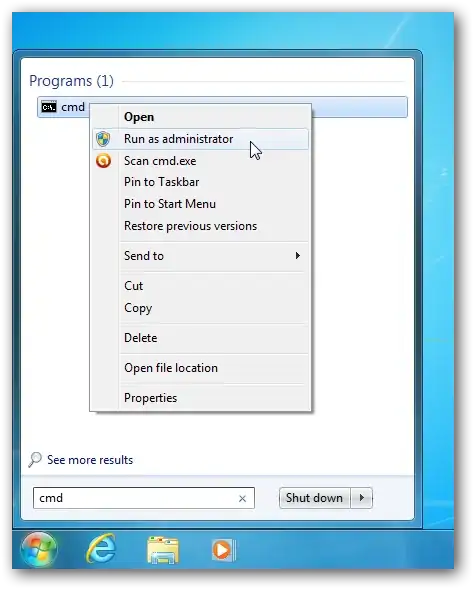
  • Click the Windows Orb (Start) > All Programs > Accessories and right-click Command Prompt, then "Run as Administrator".
  • Type assoc .zip=CompressedFolder and press Enter.
  • You may have to restart the computer. enter image description here
  • Good answer, and I considered both this as well as a reg file to restore the Compressed Folders feature, but IMO 7–Zip is *far* better compared to this half–baked OS function that [doesn't even support something as basic as Unicode](http://superuser.com/a/481366/138343). – Karan Feb 01 '13 at 04:12