I have Windows XP, and I installed Windows 7 to my D: partition. In Windows 7 I changed the timeout to 0 and default to 'Windows XP' from bcdedit. Now I can't see the OS selection at my startup. It always loads Windows XP. How can I solve this? Can I edit bcdedit.exe from Windows XP?
Asked
Active
Viewed 1,927 times

4 Answers
7
You should be able to edit the BCD with EasyBCD.
It will let you change your boot order to whatever you like, but with a nice GUI around it.


-
1You know what, I'll upvote your answer ;-) – Ivo Flipse Oct 13 '09 at 05:53
-
"Great minds think alike" :-) . Thanks! – Snark Oct 13 '09 at 05:54
-
2I decided to delete mine and just add my things with yours, makes it easier to decide who to upvote ;-) – Ivo Flipse Oct 13 '09 at 06:20

1
Am I wrong? Can't you change these settings by going to msconfig? Or am I not understanding the question?
Go to run and type MSCONFIG and click on the boot tab. There you can change the boot timeout and default OS

thegreyspot
- 1,260
- 7
- 23
- 31
0
You have no need to use any external software for setting up for default boot ..
Go to System properties -> Advance System Settings -> Startup & Recovery.
See the Screen of my OS. I have installed Win2k3 Server and Win7 on my laptop.
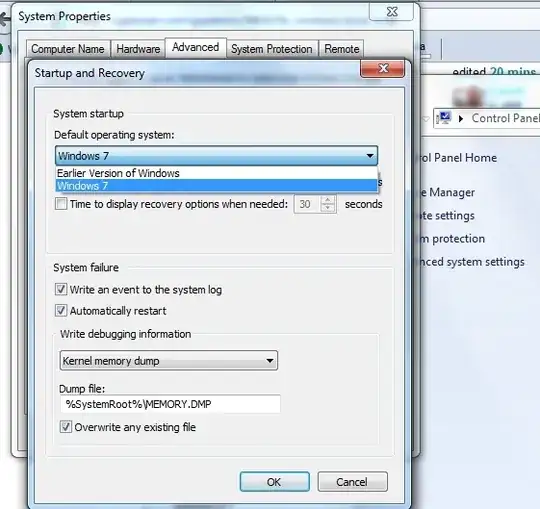
just select your default OS that you want to start. and change the timeout time below this. you can use 5 or 10 seconds for this. may be enough to select an operating system to select from the list..

Niranjan Singh
- 1,893
- 1
- 13
- 20