54

I think I have two directories with the same content, but I want to check it.

Also, I want to exclude a folder that is inside both directories.

How can I do it?

tirenweb
  • 1,347
  • 2
  • 14
  • 22

1 Answers1

63

command line:

diff --exclude=direxclude -r dir1 dir2

openSUSE 12.1: ok.

sttr@linux-sgfb:/tmp> md dir1
sttr@linux-sgfb:/tmp> md dir2
sttr@linux-sgfb:/tmp> cd dir2
sttr@linux-sgfb:/tmp/dir2> md 10
sttr@linux-sgfb:/tmp/dir2> md 11
sttr@linux-sgfb:/tmp/dir2> md 12
sttr@linux-sgfb:/tmp/dir2> md 14
sttr@linux-sgfb:/tmp/dir2> cd ..
sttr@linux-sgfb:/tmp> cd dir1
sttr@linux-sgfb:/tmp/dir1> md 15
sttr@linux-sgfb:/tmp/dir1> md 11
sttr@linux-sgfb:/tmp/dir1> md 12
sttr@linux-sgfb:/tmp/dir1> md 17
sttr@linux-sgfb:/tmp/dir1> cd ..
sttr@linux-sgfb:/tmp> diff --exclude="11" -r dir1 dir2
Only in dir2: 10
Only in dir2: 14
Only in dir1: 15
Only in dir1: 17
sttr@linux-sgfb:/tmp> diff --exclude=11 -r dir1 dir2
Only in dir2: 10
Only in dir2: 14
Only in dir1: 15
Only in dir1: 17
sttr@linux-sgfb:/tmp>

CentOS 6.3 64: ok.

[root@local tmp]# mkdir dir1
....

Ubuntu 12.04 TLS: ok.
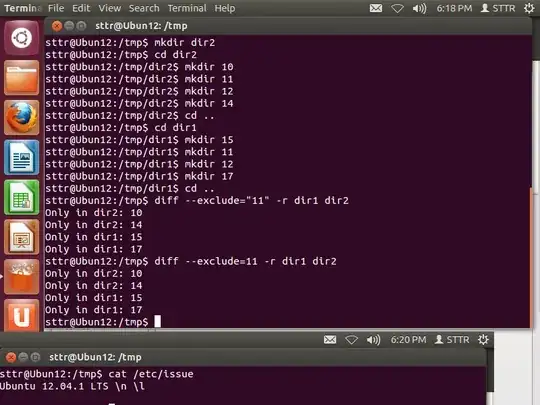
Ubuntu 12.04 TLS

STTR
  • 6,767
  • 2
  • 18
  • 20
  • 2
    @STTR sorry but it didn't work – tirenweb Feb 08 '13 at 16:51
  • @user35538 Could you please be more specific? What didn't work, what did you enter? – Daniel Beck Feb 08 '13 at 17:03
  • 2
    `diff --exclude="direxclude" -r dir1 dir2` variant? – STTR Feb 08 '13 at 17:04
  • version OS test? – STTR Feb 08 '13 at 17:15
  • 1
    @STTR Ubuntu 12.04 – tirenweb Feb 08 '13 at 17:39
  • @user35538 Ubuntu 12.04.1 LTS? – STTR Feb 08 '13 at 17:52
  • http://superuser.com/questions/548476/searching-subdirectories-one-one-level-down-for-file – STTR Feb 08 '13 at 18:05
  • Works at OS X 10.10. – TCB13 Aug 29 '15 at 12:04
  • 2
    @STTR I understand that `-x foldername` can be used to explicitly list all folders that shouldn't be used for comparison. Supposed I want to exclude all `.git` files from being used in the `diff`, but there could be multiple `.git` folders across multiple directories. how would you do that? – alpha_989 Aug 01 '18 at 01:00
  • This doesn't seem to work for me on Ubuntu 16.04.3 LTS. It runs without error but still considers the directory that I want to exclude. – Ryan Feb 14 '19 at 01:29
  • Adding the option `-N` to `diff` makes it also treat files that are present only n one side to be treated as empty on the other side, so that a complete patch will be produced. Otherwise, `diff` will just say that the file is only in one side but will not print out it's content. – Golar Ramblar May 08 '19 at 10:51
  • 2
    This answer doesn't really answers the question. It asks a way to ignore folder in both directories when diffing not to ignore ALL folders matching some name.. – Foto Blysk May 09 '19 at 16:13
  • I've tried that and it worked for me. I was even able to exclude multiple folders just by repeating the exclude flag: `diff --exclude=foo --exclude=bar -r dir1 dir2`. – Gucu112 Jun 11 '20 at 11:42