30

I am not a programmer, just a user who finds Notepad++ very useful.

I want to open Notepad++ twice for separate projects. Each would open with different shortcut (icons). I've read about opening separate instances of Notepad++ using -multiInst and/or -nosession and have not figured this out. I either open the original instance or a blank instance (with no obvious way to open the first, much less the second).

Someone had suggested loading Notepad++ twice, but all that happens is an over-write. I tried creating a sub-directory in Notepad++ with the same results as above.

I am using Windows XP and Notepad++ 5.9.6.2

What am I doing wrong?

Peter Mortensen
  • 12,090
  • 23
  • 70
  • 90
David
  • 301
  • 1
  • 3
  • 3
  • 5
    My recommendation if you want to have two notepad++s open at the same time: Open two windows inside of one notepad++ and drag one of the those windows by clicking the tap (what separates the two files) and drag it outside of your notepad++ application. This will open two windows of Notepad++ – Zero Feb 12 '13 at 00:36
  • I tried both of these with basically the same results. Where is the second instance/window? My current shortcut icon is: Target: "C:\Program Files\Notepad++\notepad++.exe" with or without various combinations of -multiInst -nosession Start In: "C:\Program Files\Notepad++\localization" It would seem to me that my shortcut icon should point to my original set of .txt files and that a second shortcut should point to my new set of .txt files, but this does not seem to be the case. At least not as far I can determine. (If I'm wrong, please reveal behind which curtain the Wiz is. – David Feb 16 '13 at 00:16
  • NB For some reason Zero Stack's suggestion doesn't work if you drag a new tab, even if you type text first. But save as a temp file and it works. – Peter Taylor Sep 29 '14 at 14:09
  • If you're looking for an easy solution, IMHO ZeroStacks advice is surpassed by the answer on the existing (duplicate) question – Crowie Dec 18 '14 at 13:05

2 Answers2

41

I tested some options from the Notepad++ wiki, and this one worked for me while others didn't.

I know you already mentioned -multiInst. But maybe you are doing something wrong? I just added a detailed description:

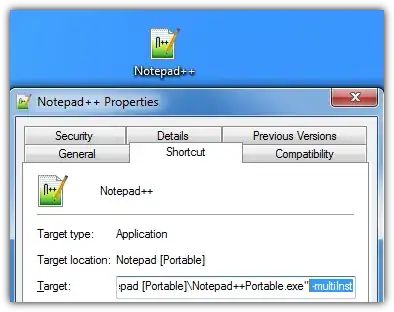
  1. Create a new shortcut to your notepad++.exe
  2. Go to Properties of the shortcut (right-click on it)
  3. Append -multiInst to the target line. It should look like this Enter image description here

    Notepad++ v6.2.3.


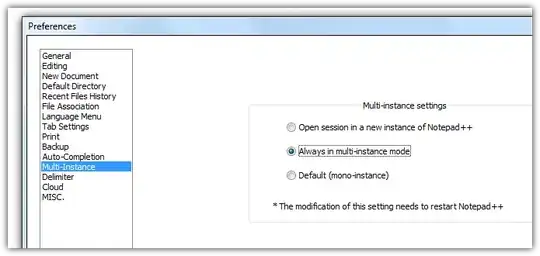
Since Notepad++ v6.4.3 a new option was added which enables multi instances:

Enter image description here

Jimadine
  • 1,282
  • 1
  • 10
  • 13
nixda
  • 26,823
  • 17
  • 108
  • 156
  • Except it would make a difference because your using a totaly different version `v5` vs `v6` – Ramhound Feb 12 '13 at 12:32
  • 3
    I tested his [version 5.9.6.2](http://notepad-plus-plus.org/download/v5.9.6.2.html) and its working with *-multiInst*. – nixda Feb 12 '13 at 12:50
  • I tried both of these with basically the same results. Where is the second instance/window. My current shortcut icon is Target: "C:\Program Files\Notepad++\notepad++.exe" -multiInst Start In: "C:\Program Files\Notepad++\localization" – David Feb 16 '13 at 00:02
  • @David I can't tell you what went wrong on your system. The -multiInst method is a widely accepted method. But I have searched once more and [stumbled up this](http://superuser.com/questions/202399/how-to-make-notepad-open-each-file-in-new-window). please try the method with that empty file called *asNotepad.xml* – nixda Feb 16 '13 at 00:09
  • I tried both of these with basically the same results. Where is the second instance/window? My current shortcut icon is: Target: "C:\Program Files\Notepad++\notepad++.exe" with or without various combinations of -multiInst -nosession Start In: "C:\Program Files\Notepad++\localization" It would seem to me that my shortcut icon should point to my original set of .txt files and that a second shortcut should point to my new set of .txt files, but this does not seem to be the case. At least not as far I can determine. (If I'm wrong, please reveal behind which curtain the Wiz is. – David Feb 16 '13 at 00:17
  • Thank you nixda! The posting by Matt Brunell, plus a little insight of my own answered the question. While I have only suspicions how my original instance of Notepadd++ works, I am reasonably sure I can open more instances if necessary. – David Feb 19 '13 at 17:44
  • n.b. When I tried this, I *thought* that I wasn't getting a second instance but was, in fact, stacking up new Notepad++ windows, all with the same session being opened. Adding -multiInst -nosession remedied that, giving me a nice clean second window. – owjburnham Aug 06 '17 at 12:52
  • 2
    Wanted to add that in Windows 10, after you've enabled the multi-inst, you can right click the notepad++ icon in the taskbar and hit notepad++ to open new window. Took me a second to figure it out, so wanted to share. – John Lee Aug 22 '18 at 17:58
14

In version 6.6.9 just right-click on the file tab and choose open in new instance.

Kevin Panko
  • 7,346
  • 22
  • 44
  • 53
  • 6
    Beware that this appears to only work with "clean buffers", i.e. a file that is unmodified since last save. If I just "randomly paste some stuff", I can't *move to new instance*. (This was mentioned over on [StackOverflow](http://stackoverflow.com/q/13252968/122764). Maybe this behaviour is the source of the downvote?) – Cornelius Feb 24 '15 at 13:23
  • Another gotcha is it doesn't work on Ctrl+N new files (not until they have been saved at least). The option is grayed out. Otherwise this is the correct answer for me. – fiat Sep 27 '16 at 05:41