I'm probably one of the few who uses this, but I use it a lot. After my upgrade to LibreOffice 4.0, the Horizontal rule menu item is missing from the Writer Insert menu. Where did it go? How can I get it back?
Asked
Active
Viewed 1.1k times
18


-
2OK, really bad news: this was broken in the latest update, isn't fixed in the next Release Candidate, and it doesn't look like people understand why invisible HTML Horizontal Lines are a problem for some people. Here is the [latest answer](http://ask.libreoffice.org/en/question/14922/why-is-horizontal-line-broken-in-401/) I got from the LibreOffice help forum. – Mar 09 '13 at 20:39
1 Answers
14
It seems like the horizonal rule may have just been a border style applied to a paragraph, and now that is more official as it appears as a paragraph style.
So you can achieve the same thing by clicking the pararaph you want to be horizonal rule, and clicking "Horizonal Line":
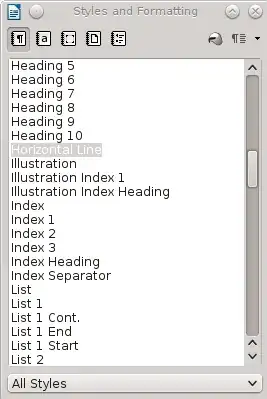
Once you have done this once, you can then select it from the styles quick dropdown. Once you get used to this way of thinking, the horizonal line is just another style, and you'd set up whatever types of line you are after.
You could enable the "borders" icon from the Frame toolbar to get quicker access, or use the old trick of entering three hyphens, tildas or underscores, which auto-correct will convert to a horizonal line with different thicknesses.

Paul
- 59,223
- 18
- 147
- 168
-
5Thanks. So glad they took something easy and useful and made it complicated and useless. – user197749 Feb 13 '13 at 12:47
-
My apologies -- it *is* easier than it seems at first. I still don't see the rationale for the change, though – user197749 Feb 13 '13 at 13:18
-
2@user197749 I imagine it is a difficult decision to balance the simplification of a menu versus appearing to remove functionality. My guess is that lots of people asked the question "how can I update the look of all my horizontal rules", and having to explain it is just a style. Now you can't insert a rule without realising it is a style, and so should be managed in the same way as any other style. – Paul Feb 13 '13 at 21:08