5

Is it possible to set up XScreensaver so that it would turn the LCD backlight off only when I lock the screen by hand?

I thought it must be controlled by the "Quick Power-off in Blank Only Mode", but this option seems to work only in combination with Standby/Suspend/Off options. So what may be a good way of keeping the screen backlight off when the screen is locked?

terdon
  • 52,568
  • 14
  • 124
  • 170
v_2e
  • 203
  • 4
  • 9

1 Answers1

7

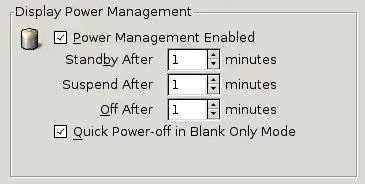
It seems that the "Quick Power-Off in Blank Only Mode" is only enabled when power management is enabled (makes sense, however the GUI implies otherwise IMO).

I have set every timed power management option to one minute and enabled the quick power-off option. Now whenever I lock manually the screen powers-off immediately. When I push a button the screen powers back on and powers off after one minute.

Power options

It should be noted that power management is also applied when not in screensaver.

siebz0r
  • 456
  • 3
  • 11
  • 1
    > however the GUI implies otherwise IMO - Exactly! I did try this method before posting my question. The reason I do not use it as you suggested is that I need my screen to stay on **all the** time except when PC is locked. – v_2e Feb 25 '13 at 19:51
  • 1
    It should also be noted that setting Display Mode to `Disable Screen Saver` also disables Power Management. – JB0x2D1 Sep 27 '14 at 12:08