7

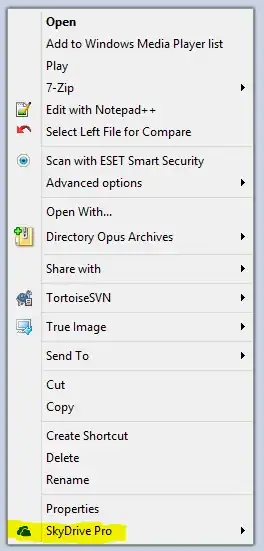
I've recently installed Microsoft Office 2013 and noticed a new SkyDrive Pro option is added to the context menu when I right click on a file or folder. I'm not using SharePoint and do not want that extra menu option there.

How do I remove SkyDrive Pro from the Context Menu?

enter image description here

Kobus Smit
  • 251
  • 2
  • 9
  • possible duplicate of [Windows: How to remove items from the right click (context) menu?](http://superuser.com/questions/5011/windows-how-to-remove-items-from-the-right-click-context-menu) – RJFalconer Oct 30 '14 at 12:46

2 Answers2

8

Open the Run Dialog by pressing Win + R Type in cmd and press Enter to open a Command Prompt

If you are running 32 bit Office on 32 bit Windows type in

regsvr32 /u "%programfiles%\Microsoft Office\Office15\GROOVEEX.DLL"

If you are running 32 bit Office on 64 bit Windows type in

regsvr32 /u "%programfiles(x86)%\Microsoft Office\Office15\GROOVEEX.DLL"

If you are running 64 bit Office on 64 bit Windows type in

regsvr32 /u "%programfiles%\Microsoft Office\Office15\GROOVEEX.DLL"

and press Enter

If it was successful you should see this confirmation dialog:

enter image description here

Note that you must have Administrative rights to do that. For more information see

Superuser - How to access the Administrator Command Prompt in Windows 8?

Windows Server Documentation - Start a Command Prompt as an Administrator
Kobus Smit
  • 251
  • 2
  • 9
  • 1
    hi! on 64 bit windows you can also try `regsvr32 /u "%programfiles(x86)%\Microsoft Office\Office15\GROOVEEX.DLL"` – leugim May 14 '13 at 01:02
1

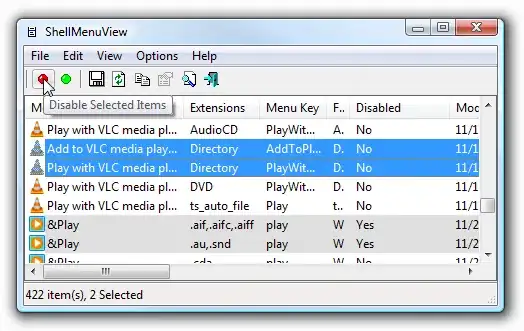
From this answer in another similar question, you can use ShellMenuView to remove Context Menu items.

enter image description here

Other alternative software for removing context menu items:

  • Default Programs Editor - Its UI makes it easy to disable context menu of a specific file type.

  • MenuMaid - Its UI makes it easy to disable all context menu from a specific program.

galacticninja
  • 6,188
  • 16
  • 78
  • 120