10

I am trying to figure out who's locking my COM port. Tried to search but could not find a way to figure that out. I am using XP.

Was wondering if 'Process Explorer' utility provides something for the same but could not find something helping.

Is there a command that shows up all the applications tied up to specific COM ports on the system?

Thanks
1 Answers1

8

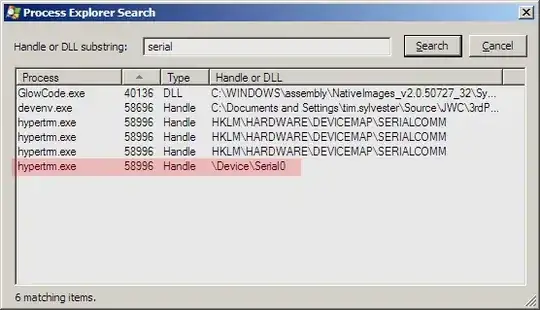
Yes, in Process Explorer, the application using the port will have a "File" handle called \Device\SerialN where N is a zero-based index.

enter image description here

Update:

The "N" in "serialN" is not the COM port number, it's the index into the list of active ports. If you only have one port in use, it will always (?) be "serial0", and the second one you open will be "serial1". If you open them in the opposite order, the numbers will be reversed.

Check out the QueryDosDevice API. You should be able to iterate through COM1...COM? and get the "\device\serialN" entry for each open port. I'm not aware of a utility that will do this, you may need to roll your own.

There's a more COM-port-specific example here.

Campa
  • 295
  • 1
  • 3
  • 8
Tim Sylvester
  • 343
  • 2
  • 7
  • Thanks, the figure above means it's COM 0? I attached HyperTerminal to COM2 and see the entry as Serial0, same as in the figure shown above. –  Oct 13 '09 at 21:24
  • @Manav No, it's not the port number. In my case it was COM4 that was open. I updated my answer to address this distinction. – Tim Sylvester Oct 13 '09 at 21:40
  • 1
    In case someone tries this: With my USB->Serial adapter in Windows 10, the device name is not `\Device\Serial0` but `\Device\VCP0`, probably for Virtual Com Port (my guess). – Jens Sep 03 '19 at 10:52