17

Is there a program available for Vista, that allows me to set up a folder as an SFTP connection to a remote server?

The use case is to have a folder on my desktop, where I can drag/drop/edit files and have my remote location be updated automatically.

I've googled this to no avail. Thanks!

bigmattyh
  • 1,514
  • 3
  • 12
  • 12
  • See also "Keep ftp folder sync’d with windows folder" at http://superuser.com/questions/48782/keep-ftp-folder-syncd-with-windows-folder – Arjan Oct 31 '09 at 13:05
  • [win-sshfs](https://code.google.com/p/win-sshfs/) is decent, but doesn't automatically reconnect when the connection is broken. – endolith Mar 11 '14 at 13:49

7 Answers7

17

NetDrive is free for home use and fulfills all your requirements. See its review in lifehacker.
Features:

  • Mounts remote storage as a local hard disk on your PC
  • Data transfer by drag and drop files in windows explorer
  • Able to run files (video, audio and any other .exe files)
  • Mounts drive automatically when Windows starts.
  • Operating System : Windows 2000, XP, Vista, 7, 2003/2008 (32/64bit)

image

Open Source alternative:

win-sshfs is a new open-source project that mounts SSHFS/SFTP as a network drive :

SSH(SFTP) filesystem made using Dokan and SSH.NET library. It allows you to mount remote computers via SFTP protocol like windows network drives.

Commercial alternatives:

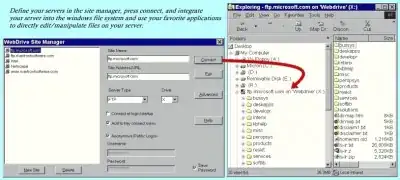
For example, WebDrive ($59.95), reviewed here:

WebDrive integrates FTP, WebDAV, SFTP or FrontPage servers into the Windows desktop by making your web server appear as a network drive.

image1

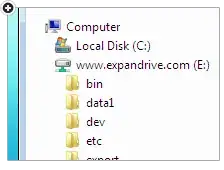
Another option is ExpanDrive ($39.95) :

With ExpanDrive, you can securely access any remote file server directly from Explorer, or even the command line. No need to open a separate SFTP client just for file transfer. ExpanDrive extends the way all applications on your PC can access data.

image2

harrymc
  • 455,459
  • 31
  • 526
  • 924
6

JFYI: we have made SFTP Net Drive free application available. It lets you mount the remote SFTP folder as a local disk with a drive letter.

5

ExpanDrive will let you do this. It has a 30-day trial, but requires a purchase ($39.95) after the 30 days.

Nick
  • 103
  • 3
heavyd
  • 62,847
  • 18
  • 155
  • 177
1

DirectNet Drive is free for home use.

http://directnet-drive.net/index.php

ihtus
  • 299
  • 3
  • 10
1

I thought FUSE would be helpful, but the Windows section claims:

Is it really true that there are no FUSE port for Windows? If anyone knows of one add it to this list, please.

So, if anyone here knows about it: edit that page!

However, that very same Windows section does list other options, some of which apparently "fall back to implementing a FUSE compatibility layer on top of FIFS which implements a SMB server to provide access to other filesystems". I doubt it's useful, but if all else fails then looking at that list might help. It seems that Dokan might be a good FUSE-like alternative for Windows, especially for SSH/SFTP.

(And, when really taking things to extremes, one could even use DeleGate as a FTP-to-SFTP gateway, just in case one finds something that only supports FTP...)

Arjan
  • 30,974
  • 14
  • 75
  • 112
  • There is a new open source project named "win-sshfs" that uses Dokan as backend. works pretty well for me: http://code.google.com/p/win-sshfs/ .. cannot add this as an answer yet. – Kaii Jul 07 '12 at 21:45
0

Found new app - RaiDrive! So far, the best! https://www.raidrive.com/

ihtus
  • 299
  • 3
  • 10
0

I might be mistaking it for FTPS (I always confuse the two), but I believe this capability is built into windows explorer. Just open a folder window and type an ftp url (including secure items) into an address bar. Something like this:

sftp://user:pass@ftpsite.example.com/

You should be able to make a normal windows folder shortcut to that location as well. If you leave off the username and password it should prompt you.

Joel Coehoorn
  • 28,098
  • 14
  • 88
  • 133