11

I recently installed Chromium OS (Hexxeh's vanilla build) on my 16 GB flash drive.

Later on, when I tried to format it, it was showing a total space of 1 GB. I tried deleting partitions in disk management, but I was only able to delete some of them. It was then showing free space of 16 MB.

For one partition, when I tried to format it, I got the following error:


error message

An unexpected error has occurred. Check the System Event Log for more information on the error. Close the Disk Management console, then restart Disk Management or restart the computer.


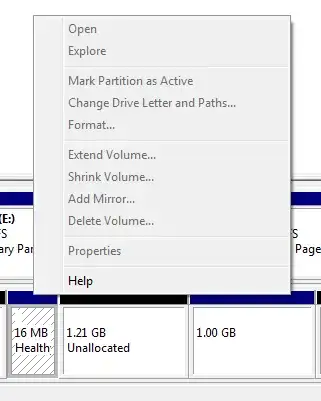
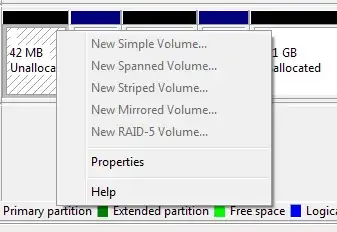
The following images show the partitions that I cannot delete:
enter image description here

What can I do to reclaim the full space of my flash drive?

nc4pk
  • 9,037
  • 14
  • 59
  • 71
simplyblue
  • 415
  • 2
  • 8
  • 17

3 Answers3

18

The disk most likely needs to be cleaned. Use the command line utility 'diskpart' to simply just wipe clean the entire device.

DISCLAIMER:

It is recommended that you use the Diskpart utility cautiously because Diskpart enables explicit control of partitions and volumes.

From Run: diskpart

RunDiskpart

DiskPart

1.list disk

Pay Attention Here What disk do you want to clean?

2.select disk # 

Replace # with the disk you're 100% sure you want to clean.

3.clean
4.create partition primary
5.select partition 1
6.active
7.format quick fs=fat32
8.assign
9.exit

See MS article here for more info: http://support.microsoft.com/kb/300415?wa=wsignin1.0

MDT Guy
  • 3,741
  • 1
  • 18
  • 37
  • on step 4 i get this error, No usable free extent could be found. It may be that there is insufficient free space to create a partition at the specified size and offset. Specify different size and offset values or don't specify either to create the maximum sized partition. It may be that the disk is partitioned using the MBR disk partitioning format and the disk contains either 4 primary partitions, (no more partitions may be created), or 3 primary partitions and one extended partition, (only logical drives may be created). – usr30911 Jan 12 '16 at 11:57
2

I ususally solve those strange situations with usb dongles with the

HP USB Disk Storage Format Tool

you can find it on Google

AndreaCi
  • 1,320
  • 1
  • 9
  • 19
  • Thanks, this registry trick solved the problem.Anyways thanks for the answer.!! http://answers.microsoft.com/en-us/windows/forum/windows_7-hardware/usb-flash-drive-prompts-with-write-protected/2012d40c-7d90-4967-b2c2-2d67c08561e2 – simplyblue Mar 01 '13 at 15:59
-2

Download Rufus and click on "FreeDOS", then it will wipeout and then format it the normal way to make it working as usual. - LordXuran