3

Is there a way to bypass my ISP provided CPE/router's DNS settings? I'd like to use OpenDNS but I am unable to access the administrator acount of the CPE. I tried logging in using the default passwords (admin/admin, admin/1234, etc) to no avail.

I found out later that the admin password is generated using a generator where you input the CPE's MAC address. I tried emailing the manufacturer of the CPE (Huawei, the CPE is Huawei BM625) and my ISP but they aren't replying. I also saw similar queries (lots of them!) at Huawei's forums, without a single reply.

So as a last resort, I'd like to know a way to bypass the CPE's DNS settings.

My subscription is for a WiMAX service. I'm using Windows 7 and have already set the DNS settings for the Local Area Connection:
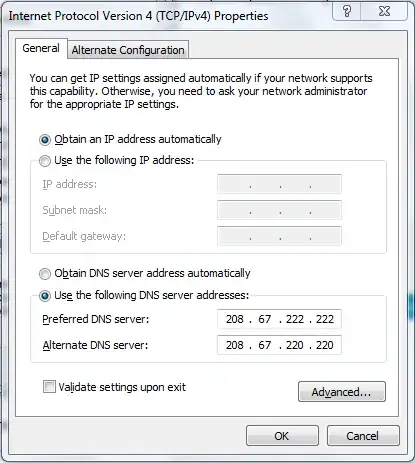
enter image description here

However I still am not seeing the "You are already using OpenDNS" text at OpenDNS's site.

And when explicitly using the OpenDNS servers I still seem to get 208.69.38.150 rather than the expected 208.69.38.160:

nslookup www.opendns.com. 208.67.222.222

  Server: resolver1.opendns.com
  Address: 208.67.222.222 

  Non-authoritative answer:
  Name: www.opendns.com
  Address: 208.69.38.150
Ramon Marco Navarro
  • 294
  • 1
  • 3
  • 11

4 Answers4

2

If you use the "nslookup" command, you will get a > prompt, where you can specify a DNS server of your choice. Use the "server" command, followed by either a hostname or an IP address of the server of your choice, such as the ones from OpenDNS. I do not think that your ISP will proxy the DNS requests. However, your country border routers may block access to foreign DNS servers, and if not blocking the access to DNS servers, can block access to the actually returned IP address from your chosen DNS.

In other words, there are different ways that you can be blocked from using other DNS servers from your internet connection, but usually, this is not a problem.

jfmessier
  • 2,770
  • 5
  • 26
  • 31
1

When visiting their website, OpenDNS determines if you're using their services by checking the IP address you've requested.

When asking my default DNS, www.opendns.com refers to IP address 208.69.38.150:

dig www.opendns.com

  [..]
  www.opendns.com.      30  IN  A   208.69.38.150
  [..]

Asking their DNS, www.opendns.com yields another IP address, 208.69.38.160:

dig @208.67.222.222 www.opendns.com

  [..]
  www.opendns.com.      30  IN  A   208.69.38.160
  [..]

Until the end of October 2009, browsing to http://208.69.38.160 would always show:

OpenDNS - Manage your DNS settings - You're using OpenDNS!

But http://208.69.38.150 would always tells you:

OpenDNS - Start using OpenDNS - It's free.

Beware: Since OpenDNS has introduced payed plans mid-October 2009, the homepage no longer clearly states one is already using OpenDNS! Instead, it always shows:

OpenDNS trickery

(Maybe this will be changed back some day. To me, this new website feels a bit like tricking people into getting a paid account. Even signing up for the free "OpenDNS Basic" gets one to the Store nowadays, while actually to just use the OpenDNS servers one does not need an account to start with. But true, they do state "A store for free? [..] And don't worry, if you aren't using the paid service we won't ask for a credit card or anything like that.")

The different IP addresses are still used, so, if any of the following commands shows 208.69.38.160, then you're using OpenDNS:

  • dig www.opendns.com
  • ping www.opendns.com
  • nslookup www.opendns.com
  • host www.opendns.com

As your computer may have remembered that www.opendns.com refers to 208.69.38.150, you might indeed need to run ipconfig /flushdns (or dscacheutil -flushcache on Mac OS X) like Svish commented.

Gaff
  • 18,569
  • 15
  • 57
  • 68
Arjan
  • 30,974
  • 14
  • 75
  • 112
  • After running `ipconfig /flushdns` as an administrator, `nslookup www.opendns.com` returns `208.69.38.150` – Ramon Marco Navarro Oct 16 '09 at 17:30
  • And, on a Mac `nslookup www.opendns.com` also shows which DNS server is used. Did you get such information as well? – Arjan Oct 16 '09 at 17:40
  • I just tested on Win XP: `nslookup www.opendns.com. 208.67.222.222` (indeed, with an extra dot after .com, which for some reason is required on my old XP machine) yields 208.69.38.160. – Arjan Oct 16 '09 at 17:53
  • On a Mac, the user itself must flush the cache, not some super user. And on XP, ipconfig /all shows the details, including DNS. Anything odd there? And what about a good old reboot? – Arjan Oct 16 '09 at 18:03
  • And I assume you did as described on http://forums.opendns.com/comments.php?DiscussionID=3876 to get that settings dialog that you referred to in your question? – Arjan Oct 16 '09 at 18:09
  • Rebooted, flushed as a normal user. `ipconfig /all` returns the correct DNS entries. (http://yfrog.com/2gcaptureap) – Ramon Marco Navarro Oct 17 '09 at 13:06
  • ...then it *should* work as expected. I can hardly believe that the ISP (or the modem/router) would route all DNS requests to their own DNS (they *could*, by intercepting port 53), but as `ipconfig /all` shows you the OpenDNS servers then your computer will surely use them. You could even validate that using sniffers like Wireshark, but that won't tell you what your modem/router or ISP is doing without your computer knowing about that... So, what does `nslookup www.opendns.com. 208.67.222.222` give you (this also uses port 53)? And you are NOT using some wireless, right? – Arjan Oct 17 '09 at 13:24
  • Wireless might matter, *if* Windows has different settings for each network card. I am on a Mac, and a Mac has different settings for ethernet and Wi-Fi, so changing the ethernet settings has no effect on my wireless connection. So, do your settings at http://img203.imageshack.us/img203/3401/capturek.png apply to the network connection of that WiMAX service as well? Still, the `nslookup` command *should* have given you 208.69.38.160 (when explicitly using 208.67.222.222 in that command). – Arjan Oct 30 '09 at 11:59
  • Thanks, @Gareth. As an aside: actually uploading again is probably not needed. It's just that a lot of cooked HTML (cached HTML) has not been updated after many references to `i.imgur.com` [were changed into](http://meta.stackexchange.com/questions/95732/images-manually-uploaded-to-imgur-are-not-displaying/95734#95734) `i.stack.imgur.com`. – Arjan Aug 31 '11 at 18:59
  • thanks @Arjan - in a lot of cases that's true, but I've seen some where for some reason they were missed by that mass change. I've even come across some images where the reference was changed to i.stack.imgur.com but the image was broken until changed back to i.imgur.com, hence the need to reupload. – Gaff Sep 01 '11 at 00:35
  • ...but then where did you get the images, to re-upload, @Gareth? Anyway, I asked for an automated solution: [More and more images go missing. Can the cooked HTML be rebuilt?](http://meta.stackexchange.com/questions/104856/more-and-more-images-go-missing-can-the-cooked-html-be-rebuilt) – Arjan Sep 02 '11 at 11:10
0

You should be able to do this without any problems.

The process will vary depending on your operating system and your exact configuration. OpenDNS themselves have the best instructions for your computer. Just pick your operating system, and you should be right to go!

When you manually specify a DNS server setting, most operating systems will ignore whatever is set by your modem / router, and use your manual setting instead.

EvilChookie
  • 4,569
  • 1
  • 25
  • 34
  • Too bad: since this answer was posted, https://www.opendns.com/start now first tells one to create an account. That is not really required. The instructions can still be found at https://store.opendns.com/setup/ – Arjan Oct 30 '09 at 11:22
0

Some ISPs proxy DNS requests and redirect any for outside DNS servers to their own DNS servers. So, it may not be possible

Brian Knoblauch
  • 4,743
  • 12
  • 43
  • 60