3

On a page with scrollbars, when I press the middle mouse button, I get a "tool" to scroll the page by moving my mouse.

scroll tool

How do you completely disable this functionality? I only activate it by mistake and it is never what I want.

I've read suggestions to disable this feature in the control panel, but my SetPoint settings are already set to treat the button as a "Generic Button". I also don't have the option to define set up application-specific profiles as mentioned in the Google+ post linked above.

enter image description here

Oliver Salzburg
  • 86,445
  • 63
  • 260
  • 306
  • "On a page with scrollbars..." Where's the page? Which apps do you see this behaviour in? For example, if you middle-click in a Win Explorer folder with scrollbars, does that auto-scroll too? Even with no special mouse drivers/software installed and using the generic Windows drivers, some apps *still* auto-scroll. Most browsers support this feature natively, as also apps like Word, Wordpad etc. When it's an app feature, obviously the app needs to support disabling it. Firefox does (look under `Options / Advanced / General / Browsing`), but haven't found any way for most other apps yet. – Karan Mar 08 '13 at 00:39
  • 1
    @Karan My question is specific to Chrome. The tag was removed by another user. I'll look into it once I'm back home. – Oliver Salzburg Mar 08 '13 at 19:16

1 Answers1

1

Most mice have this as a configurable setting. Go to Control Panel and search mouse. Click 'Change mouse settings'

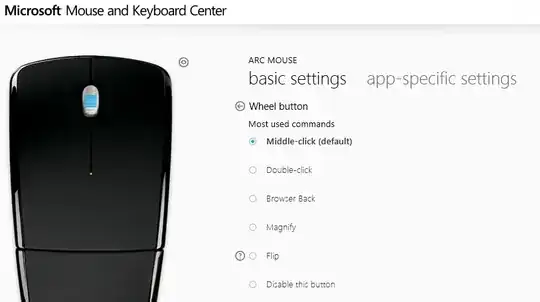
For my Arc mouse I can launch a setting panel to configure the operation of the various buttons. The wheel button can be changed to options like browser back or disabled completely. You don't specify a specific mouse brand but most should have options like this.

arc

Brad Patton
  • 10,540
  • 12
  • 40
  • 68
  • Yeah, I tried that. I have a Logitech though that comes with SetPoint Settings and in there, the button is already set to "Generic Button". I'll update my question. – Oliver Salzburg Mar 07 '13 at 16:31