I installed tigervnc-server package in server.
[root@localhost ~]# rpm -qa tigervnc-server
tigervnc-server-1.1.0-5.el6.i686
Created a vnc user and created vncpasswd also for that user.
[root@localhost ~]# useradd vnc
[root@localhost ~]# vncpasswd vnc
Password:
Verify:
[root@localhost ~]#
In /etc/sysconfig/vncserver I changed these 2 lines
VNCSERVERS="2:vnc"
VNCSERVERARGS[2]="-geometry 800x600 -nolisten tcp -localhost"
After that I restarted the vncserver service
[root@localhost ~]# service vncserver restart
Shutting down VNC server: 2:vnc                            [  OK  ]
Starting VNC server: 2:vnc
New 'localhost.localdomain:2 (vnc)' desktop is localhost.localdomain:2

Starting applications specified in /home/vnc/.vnc/xstartup
Log file is /home/vnc/.vnc/localhost.localdomain:2.log

                                                           [  OK  ]
Cleared iptables also.
[root@localhost ~]# iptables -F
While running vncviewer in client side I am getting this error
[root@client ~]# vncviewer 10.10.2.39:2
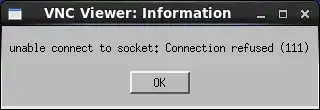
How to solve this error?


