26

When I copy the following URL from FireFox
https://example.com/away.php?to=http://example.com/page/42

and then paste, I get a link like:
https://example.com/away.php?to=http%3A%2F%2Fexample.com%2Fpage%2F42

How do I get the non-encoded link instead? Maybe there is a hidden option in Firefox, or a plugin. I tried searching the web, but didn't found anything.

Update re. duplicate question thing:

I am asking not (only) about copying text from address bar, but about copying the text from anywhere in a web page. But let's keep the link between these questions, they seem relevant.

Display Name
  • 1,113
  • 1
  • 9
  • 26
  • I don't experience this with Firefox. What version are you using? – Dave Mar 13 '13 at 14:39
  • @DaveRook 19.0.2 – Display Name Mar 13 '13 at 14:52
  • Are you copying this from the address bar in a browser or from the page itself (eg, copying a link)? – Dave Mar 15 '13 at 09:14
  • @DaveRook I'm copying a link from a web page. When i hover mouse over it, the correct link is displayed at the bottom (status bar, or what's its name), but the result is encoded link. – Display Name Mar 15 '13 at 14:32
  • 1
    The encoding you see is because the website has actually rendered it like that. The reason it's removed when you hover the mouse over is because your browser is choosing to display it differently, but when you copy and paste, that has nothing to do with the browser per se (hence why same issue occurs in notepad). – Dave Mar 15 '13 at 14:36
  • @DaveRook But can I force browser to copy link "differently" too? Or i need to roll my own new extension? The latter is not very cool, because I don't know Javascript and stuff very well. Also it takes much time. :( – Display Name Mar 15 '13 at 14:49
  • I doubt it, the copy and paste is done by the OS. It may be possible than on copy to your browser it does something to encode/decode but you'll have to search. You could try http://meyerweb.com/eric/tools/dencoder/ – Dave Mar 15 '13 at 15:04
  • @DaveRook This is not a plain text copy/paste, I select "copy link location", it's up to Firefox to format the text that will be copied. The question is how to change firefox behaviour to prevent it from encoding (or from not decoding) links. Yes, I know about that site, I actually used it to make the example in my question, but it's obviously not a solution, because it is an extra big step involved into such small task. – Display Name Mar 15 '13 at 15:15
  • I disagree - It's up to firefox how to display the information, but copying to the clipboard is done by the OS I think. Some one else can correct me here. – Dave Mar 15 '13 at 15:51
  • Firefox 20.0.1, still same problem. – Display Name May 12 '13 at 23:43
  • For non asci langiages it more fun. I get looong quoted printable. Russian wikipedia for example. – Mikhail Moskalev Sep 06 '13 at 14:39
  • @mmv-ru Same problem, I just don't think it's fun. :-P – Display Name Sep 06 '13 at 16:02
  • This is not a duplicate, please re-open people! – Flimm Nov 14 '16 at 09:43

3 Answers3

33

In about:config set

network.standard-url.escape-utf8: false

After this path copied as not encoded. But ancor keep encoded. :(

UPD:

Found updated config Value

The setting was replaced with browser.urlbar.decodeURLsOnCopy in Firefox 53+.

https://superuser.com/a/1255451/17118

Mikhail Moskalev
  • 2,008
  • 16
  • 13
15

A work around is to not copy the entire URL from the bar (this works in firefox). And then it wont encode it.

I found that in firefox, if I placed my cursor in the address bar and press 'CTRL A', 'CTRL C', and then Paste it into whatever (an email, notepad++ etc). Then the url would change from what was originally in the URL.

EG.

http://example/test.php?p=(999)+999+999

Would become:

http://example/test.php?p=%28999%29+999+999

But if I copied from the 'x' in example:

xample/test.php?p=(999)+999+999

The URL was not changed on paste and it was easy to fix the front of the URL.

Hope this clears it up.

johnsnails
  • 251
  • 2
  • 5
  • 6
    In a previous question (this one is marked as duplicate), an answer posted by @m4573r [says](http://superuser.com/a/480702/83912) that _you can edit the URL in the address bar (by adding and then removing a character), and the copy-pasting should preserve the encoding_!! :)) – Nostromov Sep 06 '16 at 23:48
  • 1
    This also works in Chromium/Chrome – Ruslan Oct 15 '19 at 13:28
7

Edit

It appears as of Firefox 60 it is no longer possible via the methods in this post, but I'll leave the post for historical reasons...


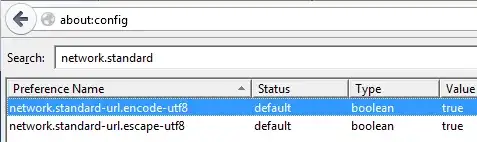
Open the config page in Firefox by typing in about:config, then promise to be careful and enter.

Type network.standard-url into the search box.

Ensure both values are set to true.

enter image description here

Source

Edit

As per mmv-ru comments, setting escape-utf-8 to false helped. So I assume keeping encode set to true!

Dave
  • 25,297
  • 10
  • 57
  • 69